AI Receptionists for Small Business: Compared Options, Real Pricing, and Who Should Use One
Last updated: November 17, 2026
Your phone rings while you’re under a sink, mid-haircut, or showing a house. You can’t answer. The caller doesn’t leave a voicemail. They call the next business on the list.
AI receptionists promise to fix that for less than a nice dinner per month. Some deliver. Others will cheerfully tell your customers the wrong hours. So how much does an AI receptionist cost for a small business, and is it worth it? This guide compares the main options with prices pulled straight from vendor pricing pages (rechecked November 17, 2026), works out real monthly bills at 100 and 300 calls, explains the billing models that trip people up, and helps you decide whether you need one at all.
Key Takeaways
- What it is: an AI voice agent that answers your line 24/7, handles common questions, takes messages, books appointments and transfers urgent calls.
- Typical cost: entry plans run about $29–$150/month; Smith.ai and Quo have limited free usage. Billing is per minute, per call or per unique caller.
- Our math: at 100 calls a month (2.5-minute average), the cheapest qualifying tiers we priced ranged from about $49 to $213 a month, or roughly $0.49–$2.13 per call.
- Best fit: owner-operators and small teams who miss calls on jobs or after hours, and whose callers mostly want answers or a booking.
- Skip it or add humans if calls are complex, emotional or high-stakes. Outbound AI calling needs prior consent under the TCPA.
What an AI receptionist actually does
Modern AI receptionists aren’t the old “press 1 for sales” phone trees. They hold a natural conversation, and depending on the plan, they can:
- Answer FAQs (hours, service area, pricing policy) from information you give them
- Take detailed messages and send you a summary, transcript and recording
- Book or reschedule appointments in your calendar or field-service software
- Transfer calls to you or a teammate, either “blind” or with a “warm” briefing first
- Filter spam and robocalls
- Text callers a link (booking page, quote form) during or after the call
What they don’t do well: judgment calls, angry customers with complicated histories, anything requiring a license, and questions you never taught them about.
The cost case: AI vs. a human receptionist
For context, the Bureau of Labor Statistics puts the median receptionist wage at $18.27/hour (May 2025) (BLS). That’s before payroll taxes, and it covers one person, during business hours, answering one call at a time.
An AI receptionist on a $50–$150/month plan works nights and weekends and can take simultaneous calls. Rosie and Jobber, for example, both say they can handle multiple calls at once. That doesn’t make AI a full replacement for a great front-desk person who knows your regulars. But for overflow and after-hours calls, the math usually works.
AI receptionist pricing compared (checked Nov 17, 2026)
| Service | Entry paid plan | What’s included | Overage | Pricing model | Notable features |
|---|---|---|---|---|---|
| Smith.ai AI Receptionist | Free (25 calls/mo); Pro $150/mo | Pro: 75 calls/mo | $3.00/call on Free; $2.50/call on Pro-75 | Per call | Can transfer to live North America–based human agents 24/7; month-to-month |
| Goodcall | Starter $79/mo | 100 unique customers/mo | $0.79 per extra customer | Per unique caller (no per-minute charges) | Local number included; repeat callers in a month count once |
| Rosie | Professional $49/mo | 250 minutes/mo | Not listed on pricing page | Per minute | English & Spanish; 7-day free trial; calendar booking and live transfers start on $149 Scale plan (1,000 min) |
| Dialzara | Business Lite $29/mo | 60 minutes/mo | $0.48/min | Per minute | 10 languages incl. Spanish on all plans; warm transfer and calendar sync start on $99 Pro plan (220 min); 7-day trial |
| My AI Front Desk | Business-in-a-Box $99/mo ($79/mo annual) | 200 voice minutes + chat, SMS, CRM | ~$0.25/min via credits | Credits | Free plan with limited usage |
| Quo (formerly OpenPhone) Sona | 10 calls/mo free with a paid Quo plan; tiers $25–$199/mo | $25 = ~40 calls; $49 = ~100; $99 = ~250; $199 = ~600 | $0.45–$1.00/call | Credits per call | Requires a Quo phone plan ($19–$47/user/mo monthly; $15–$35 annual) |
| Jobber Receptionist | $29/mo add-on | 30 conversations/mo | $0.79/conversation | Per conversation | Books jobs directly in Jobber; included on Jobber Plus plan |
| Ruby (human receptionists) | From $250/mo (50 minutes) | 100 min $395; 200 min $720; 500 min $1,725 | — | Per minute | 100% live humans with optional AI enhancements |
Sources: Smith.ai, Goodcall, Rosie, Dialzara, My AI Front Desk, Quo Sona pricing, Quo plans, Jobber, Ruby.
How much does an AI receptionist cost for a small business? Our 100- and 300-call math
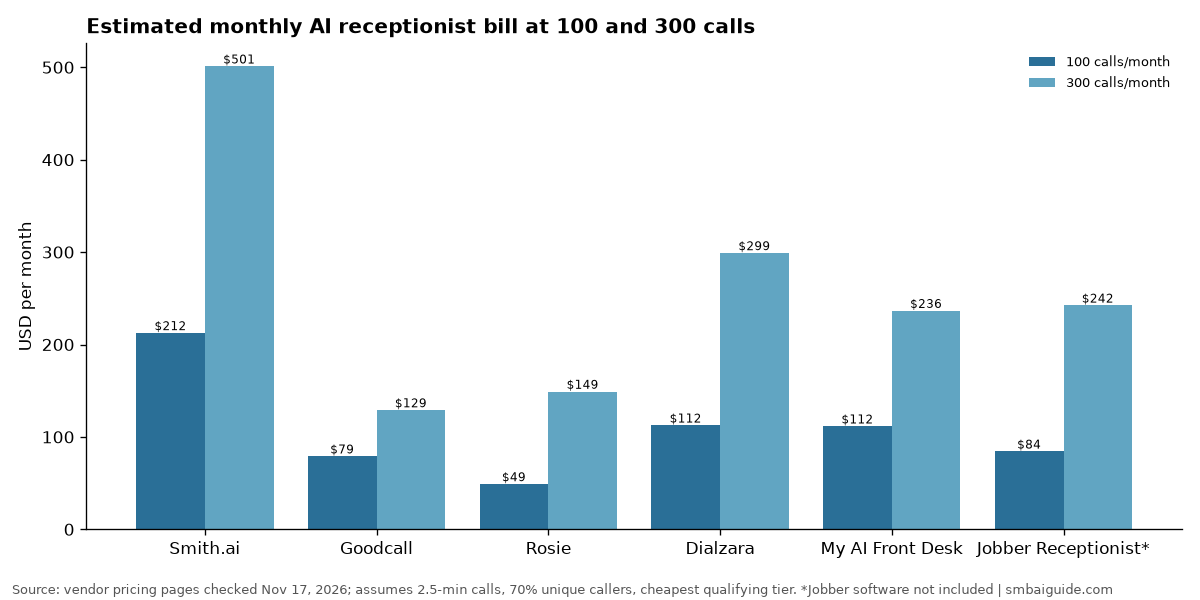
Sticker prices don’t compare, because each vendor counts something different. So we ran two typical call volumes through each vendor’s published pricing and picked the cheapest tier that covers the volume.
Assumptions (change them to match your phone log): average call length 2.5 minutes; 70% of calls come from different phone numbers (matters for Goodcall); every call counts (no spam credit); prices as listed on November 17, 2026, before tax and phone-number fees.
| Service (cheapest tier that fits) | 100 calls/mo | Per call | 300 calls/mo | Per call |
|---|---|---|---|---|
| Smith.ai | $212.50 | $2.12 | $501.00 | $1.67 |
| Goodcall | $79.00 | $0.79 | $129.00 | $0.43 |
| Rosie | $49.00 | $0.49 | $149.00 | $0.50 |
| Dialzara | $112.50 | $1.12 | $299.00 | $1.00 |
| My AI Front Desk | $111.50 | $1.11 | $236.50 | $0.79 |
| Jobber Receptionist* | $84.30 | $0.84 | $242.30 | $0.81 |
| Ruby (live humans), for comparison | over $720 (250 min) | over $7 | over $1,725 (750 min) | over $5.75 |
| In-house receptionist, wages only (BLS median $18.27/hr × 40 hrs/wk) | $3,167 | $31.67 | $3,167 | $10.56 |
Jobber Receptionist also requires a Jobber subscription, not included here. Rosie’s $49 plan covers 250 minutes but books by text link only; direct calendar booking needs the $149 Scale plan. Ruby’s overage rate isn’t published, so we show a floor.
What stands out:
- At 100 calls a month, the AI options we priced land between about $49 and $213, roughly $0.49 to $2.13 per call. A human service costs several times more per call.
- Billing model matters more than the headline price. Goodcall’s per-caller model gets relatively cheaper as volume grows ($129 at 300 calls), while Smith.ai’s per-call model roughly doubles in price per month from 100 to 300 calls, though it includes live-agent escalation.
- Long calls punish per-minute plans. If your average call is 5 minutes instead of 2.5, the Dialzara and My AI Front Desk figures rise sharply; Smith.ai and Goodcall stay flat.
- Even the priciest AI option is a fraction of in-house wages, but a person at the front desk also greets visitors, handles mail and knows your regulars. Treat AI as overflow and after-hours cover first.
Your own estimate in 3 lines: (1) calls last month × average minutes = minutes; (2) count distinct phone numbers; (3) plug both into each vendor’s tier and overage rate, then add 20% for your busy season.
Per minute, per call or per caller? Pick the model that fits your phone
This is where most buyers get surprised. Run your last month’s call log through each model:
- Per minute (Rosie, Dialzara, My AI Front Desk): Cheapest when calls are short (“Are you open Saturday?”). Gets pricier if callers ramble or calls involve long intake.
- Per call (Smith.ai, Quo Sona): Predictable when calls run long. Short spam-ish calls can still cost you. Smith.ai says it auto-filters known spammers and lets you remove up to 10% of calls as spam each cycle. Quo doesn’t count calls under 15 seconds.
- Per unique caller (Goodcall): Good when the same customers call repeatedly. Goodcall counts one phone number once per month, and says spam and wrong numbers don’t count.
- Per conversation inside your software (Jobber): Simple if you already run your business in that platform.
Quick estimate: calls per month × average minutes per call = minutes needed. Then add 20% for seasonal spikes.
Who should use an AI receptionist?
Strong fit
- Home services (HVAC, plumbing, electrical, cleaning, landscaping): owners are on job sites and many calls are “can you come out?” See our guide to AI for HVAC and plumbing businesses.
- Appointment-based businesses (salons, barbers, fitness studios, pet groomers): routine booking questions dominate.
- Solo professionals (consultants, bookkeepers, real estate agents) who need calls screened and messages captured. Agents: see also our AI for real estate agents guide.
Use with caution
- Law, medical and financial offices. Intake can involve sensitive information and regulated advice. Look for services with human backup (Smith.ai offers live-agent escalation) and ask about compliance. Ruby advertises HIPAA-compliant services for its human receptionists.
- High-ticket sales calls, where a human relationship is the product.
Probably skip
- Businesses that get a handful of calls a week and can return them within the hour.
- Businesses whose callers are mostly upset customers needing judgment calls.
How to set one up so it doesn’t embarrass you
- Write a one-page “receptionist brief.” Include hours, service area, services you do and don’t offer, pricing policy (what it may and may not say), and your top 15 FAQs with exact answers.
- Define escalation triggers. Words like “emergency,” “gas,” “flooding,” “lawyer,” “cancel my contract” should go straight to a human. Jobber, for example, lets you set keyword-based escalation by text or live transfer.
- Decide transfer rules by time of day. Business hours: warm transfer to the front desk. After hours: message plus an urgent text to the on-call phone.
- Disclose it’s AI. It’s honest, and it avoids awkward moments. Housecall Pro says its CSR AI introduces itself as AI at the start of calls, and Jobber encourages telling callers.
- Check recording-consent rules. Most services record calls. Some states require all parties’ consent to recording, so put a short notice in the greeting.
- Test it 10 times with different personas: confused senior, angry customer, Spanish speaker (if supported), someone asking for a price you don’t quote by phone.
- Read transcripts weekly for the first month and update the brief whenever the AI fumbles.
Prompt: draft your receptionist brief with any AI chatbot
Interview me one question at a time to build a phone receptionist brief
for my [type of business] in [city]. Cover: hours, service area, services
offered and NOT offered, how we handle pricing questions, booking rules,
emergency/urgent situations, who gets transferred calls and when, and our
15 most common caller questions with exact answers. When done, output the
brief as a clean one-page document.
Outbound calls are a different legal world
Most small businesses use AI receptionists for inbound calls, which is the lower-risk use. If a vendor pitches outbound AI calling (lead follow-up, reactivation campaigns), be careful. The FCC confirmed in February 2024 that AI-generated voices count as “artificial” voices under the Telephone Consumer Protection Act, which generally means you need the called person’s prior express consent (FCC). Get legal advice before running outbound AI campaigns.
Red flags when comparing vendors
- No published pricing and pressure to sign an annual contract on the first call
- No call recordings or transcripts you can review
- No way to transfer to a human
- Unclear overage rules. Find out whether calls stop, go to voicemail or keep billing when you hit your limit. Quo and Jobber, for example, let you choose to pause instead of paying overages.
- Testimonials you can’t verify. Every vendor has glowing quotes. Judge by a free trial or demo with your questions.
Next steps
- Pull last month’s call log from your phone provider: total calls, average length, and how many you missed.
- Run those numbers through the 3-line estimate above for two or three vendors with the billing model that fits your calls.
- Write your one-page receptionist brief (use the prompt above) before you start any free trial.
- Start with after-hours and overflow calls only, and keep a fast transfer path to a human for emergencies.
- Add a short recording and AI disclosure to the greeting, and read transcripts every week for the first month.
- Re-check your bill after 30 days against the estimate, and switch tiers if overages are eating the savings.
Frequently asked questions
How much does an AI receptionist cost for a small business?
Based on vendor pricing pages checked in November 2026, paid entry plans range from about $29/month (Dialzara Business Lite, Jobber Receptionist add-on) to $150/month (Smith.ai Pro). Smith.ai and Quo offer limited free usage. Your real cost depends on call volume and whether billing is per minute, per call or per caller.
Can an AI receptionist book appointments?
Many can. Jobber Receptionist books into Jobber’s schedule, and Rosie’s Scale plan ($149) and Dialzara’s Pro plan ($99) include calendar booking. Some entry plans only send booking links by text, so check the specific tier. For booking pages and reminders, see our AI scheduling assistants guide.
Will callers know they’re talking to AI?
Modern AI voices sound natural, but you should tell callers anyway. It builds trust, and some platforms, like Housecall Pro’s CSR AI, announce it automatically. Always give callers a way to reach a human.
Is an AI receptionist better than a human answering service?
It’s cheaper and always available, but less flexible. Hybrid options exist: Smith.ai’s AI can escalate to live agents, and Ruby uses live receptionists with AI-assisted tools. If most of your calls need empathy or judgment, a human or hybrid service is the safer pick.
Is it legal to use an AI receptionist?
For answering inbound calls, generally yes. Follow your state’s call-recording consent laws and protect any sensitive information callers share. Outbound AI calling carries stricter TCPA consent requirements.
How much does an AI receptionist cost per call?
On the pricing we checked in November 2026, roughly $0.43 to $2.13 per call at 100–300 calls a month, depending on the vendor and billing model. Per-minute plans get pricier as calls get longer; per-call and per-caller plans don’t.
Sources and methodology
How we gathered and calculated these numbers. Plan prices, included usage and overage rates come from each vendor’s own pricing or help pages, first checked November 2, 2026; Smith.ai, Goodcall, Rosie and Dialzara were rechecked on November 17, 2026. The 100- and 300-call scenarios are our own arithmetic using stated assumptions (2.5-minute average call, 70% unique callers, cheapest tier including overage). They exclude taxes, phone-number fees and any required base software (Jobber, Quo). The in-house figure uses the BLS May 2025 median hourly wage for receptionists × 2,080 hours ÷ 12 and excludes payroll taxes and benefits. We have not tested these services hands-on; descriptions reflect vendor documentation. No affiliate links.
Sources
- U.S. Bureau of Labor Statistics, Occupational Outlook Handbook – Receptionists: https://www.bls.gov/ooh/office-and-administrative-support/receptionists.htm
- Smith.ai – AI Receptionist pricing: https://smith.ai/pricing/ai-receptionist
- Goodcall – Pricing: https://www.goodcall.com/pricing
- Rosie – Pricing: https://heyrosie.com/pricing
- Dialzara – AI Receptionist Pricing: https://dialzara.com/pricing
- My AI Front Desk – Pricing: https://www.myaifrontdesk.com/pricing
- My AI Front Desk – How billing works: https://www.myaifrontdesk.com/tutorials/how-does-billing-pricing-work-for-my-ai-front-desk
- Quo – Sona pricing: https://support.quo.com/core-concepts/ai-automations/sona/sona-pricing
- Quo – Plans and pricing: https://www.quo.com/pricing
- Jobber Help Center – Receptionist powered by Jobber AI: https://help.getjobber.com/en/articles/receptionistpowered-by-jobber-ai/
- Housecall Pro Help Center – CSR AI Overview: https://help.housecallpro.com/en/articles/9740104-csr-ai-overview
- Ruby – Plans and pricing: https://www.ruby.com/plans-and-pricing/
- FCC – FCC Confirms that TCPA Applies to AI Technologies that Generate Human Voices: https://www.fcc.gov/document/fcc-confirms-tcpa-applies-ai-technologies-generate-human-voices