AI Bookkeeping Tools for Small Business: What They Automate (and What Your CPA Still Needs)
Last updated: November 17, 2026
Every accounting app now says it has AI. Some of that is genuinely useful, like auto-categorizing bank transactions or reading receipts. Some of it is a chat box bolted onto the dashboard.
This guide sorts it out for US small business owners. You’ll see what AI bookkeeping software actually automates today, what the major platforms charge per year (rechecked November 17, 2026), and which jobs should stay with you or your CPA.
Key Takeaways
- What AI handles well: sorting bank transactions into categories, reading receipts and bills, suggesting reconciliation matches, drafting invoice reminders, and answering “how much did we spend on X?”
- What it doesn’t replace: tax strategy, year-end adjustments, payroll and sales tax compliance, and a human review before anything is filed.
- Cheapest starting points (list): Wave Starter $0, Zoho Books Free (under $50K revenue), FreshBooks Lite $23/mo, Xero Early $27/mo, QuickBooks Simple Start $38/mo.
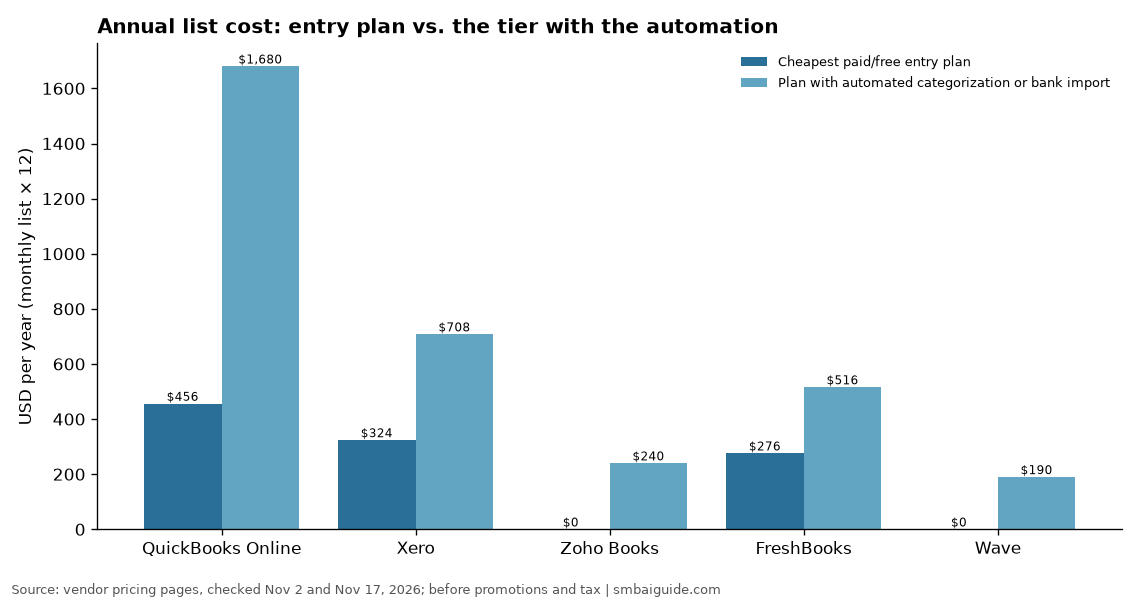
- Our cost math: the tier with the main automation runs from $190/yr (Wave Pro) and $708/yr (Xero Growing) to $1,680/yr (QuickBooks Plus) at list price.
- Biggest risk: trusting auto-categorization without review. Bad categories become a bad tax return, so review weekly and export your books monthly.
What does AI bookkeeping software automate in 2026?
Strip away the marketing and most features fall into five buckets:
- Transaction categorization. The software suggests (or applies) an expense category for each bank feed line based on past behavior and rules.
- Document capture. Snap a receipt or forward a bill, and the tool extracts vendor, date and amount.
- Reconciliation help. It matches bank lines to invoices, bills and payments, sometimes automatically.
- Chat assistants. Ask questions in plain English (“Which customers are 30+ days overdue?”) or have it draft emails and reports.
- Forecasts and anomaly flags. Cash flow projections and alerts when something looks off, like a duplicate bill or unusual charge.
None of these are new ideas. Bank rules have existed for years. What’s changed is that the suggestions are better and the chat interfaces make reports easier to get without knowing where every menu lives.
The major platforms compared
Prices are US list prices per month, checked November 2, 2026 (QuickBooks rechecked November 17, 2026). Several were running intro promotions; QuickBooks, for example, showed 70% off the first 3 months on November 17. Always confirm on the vendor page before buying.
| Platform | Entry price | Plans (monthly list) | AI and automation highlights | Good fit for |
|---|---|---|---|---|
| QuickBooks Online | Free plan (1 user, 2 invoices/mo) | Simple Start $38, Essentials $85, Plus $140, Advanced $340 | Intuit Intelligence and AI chat (beta, limited capacity) from Simple Start; Accounting AI and Payments AI on Essentials+; Plus adds auto-categorized, verified transactions and anomaly detection | Businesses whose CPA already works in QuickBooks |
| Xero | Early $27 (20 invoices, 5 bills) | Early $27, Growing $59, Established $97 | JAX AI assistant included at no extra charge; auto bank reconciliation ($5/mo add-on on Early, included above) | Growing businesses that want strong bank reconciliation |
| Zoho Books | Free (revenue under $50K) | Standard $20, Professional $50, Premium $70, Elite $150, Ultimate $275 (lower if billed annually) | Zia assistant, report insights, AI email drafting; AI bank categorization in Early Access | Budget-conscious owners, especially those using other Zoho apps |
| FreshBooks | Lite $23 | Lite $23, Plus $43, Premium $70, Select custom | Receipt scanning that extracts vendor, date and totals; partnership with Kick for automated categorization with bookkeeper review | Service businesses and freelancers who bill by invoice |
| Wave | Starter $0 | Starter $0, Pro $19 ($190/year) | Automatic bank transaction import on Pro; no AI-specific features verified | Solo operators with simple books |
QuickBooks Online
Intuit has woven AI across every paid tier. Simple Start includes Intuit Intelligence and an AI chat that Intuit labels as beta with limited capacity. Essentials adds Accounting AI and Payments AI plus Business Tax AI to help estimate quarterly payments. Plus adds auto-categorized and verified transactions, Sales Tax AI and anomaly detection. Advanced adds Project Management AI and Finance AI (QuickBooks pricing).
Note: Intuit raised prices on Essentials, Plus and Advanced for renewals on or after August 1, 2026 (Intuit).
Xero
Xero’s JAX assistant is currently included at no extra charge and respects each user’s permissions (Xero JAX). At Xerocon in August 2026, Xero announced auto bank reconciliation, smart document capture and integrations with tools like Microsoft 365, ChatGPT and Claude (Xero). Payroll runs through Gusto at $36/month plus $6 per employee (Xero pricing).
Zoho Books
Zoho’s Zia features include Ask Zia, report forecasts and anomaly views, and AI email drafting. Admins can choose which AI provider and model to use, which matters if you have data-handling preferences. Some features, including AI bank categorization suggestions, are labeled Early Access (Zoho Books help). Zoho’s help page doesn’t make clear which plans include each AI feature, so check with Zoho before you buy.
FreshBooks
FreshBooks’ receipt scanner pulls vendor, date and totals from photos (FreshBooks). Its bookkeeping offering with Kick combines automated categorization and reconciliation with human bookkeeper review (FreshBooks + Kick). Extra team members are $11/month each (FreshBooks pricing).
Wave
Wave’s free Starter plan covers invoicing and basic accounting. Pro ($19/month) adds automatic bank transaction import, and Wave Advisors offers human bookkeeping starting at $149/month (Wave pricing). We didn’t find AI-specific features on Wave’s pricing page.
What the automation really costs per year (our comparison)
The headline entry prices don’t tell you what you’ll pay for the features in this article, because the strongest automation often sits a tier or two up. We took each vendor’s monthly list price and worked out the annual cost of (a) the entry plan and (b) the cheapest plan where the main automation lives.
| Platform | Entry plan, per year | Tier with the key automation | That tier, per year | What that tier adds |
|---|---|---|---|---|
| QuickBooks Online | Simple Start: $456 | Plus | $1,680 | Transactions auto-categorized and verified, anomaly detection, Sales Tax AI (5 users) |
| Xero | Early: $324 (+$60/yr for auto bank reconciliation) | Growing | $708 | Auto bank reconciliation included, no 20-invoice/5-bill cap |
| Zoho Books | Free (revenue under $50K): $0 | Standard (monthly list) | $240 | Paid plan; AI bank categorization is still Early Access, so confirm plan coverage with Zoho |
| FreshBooks | Lite: $276 | Plus | $516 | Higher client limits; automated categorization comes via the separate Kick bookkeeping offering |
| Wave | Starter: $0 | Pro | $190 (annual price) | Automatic bank transaction import |
Cost per included user (QuickBooks, where users are capped by plan): Essentials is $85 for 3 users (about $28 per user per month), Plus is $140 for 5 users ($28), and Advanced is $340 for 25 users (about $14). If you have 4–5 people in the books, Plus costs the same per head as Essentials.
Promotions change the year-one math. On November 17, 2026, QuickBooks’ pricing page showed 70% off the first 3 months (Simple Start at $11.40/month for 3 months). That makes year one of Simple Start about $376 instead of $456, but year two is full price. Budget on list price.
Our takeaway: for most very small businesses the jump that matters is not “AI vs no AI” but whether reliable bank-feed matching is included. Xero Growing and Wave Pro get you there for well under $1,000 a year; QuickBooks’ fullest automation (Plus) costs about $1,680 a year at list price and is worth it mainly if your CPA already works in QuickBooks.
What your CPA (or you) still needs to own
AI makes the daily grind faster. It doesn’t make judgment calls. Keep these with a human:
- Reviewing categories. A meal miscoded as “supplies” or a personal charge in business expenses becomes a problem at tax time. Review flagged and new-vendor transactions weekly.
- Year-end adjustments. Depreciation, accruals, inventory counts and owner draws need someone who understands your entity type.
- Tax planning and elections. Choosing an S-corp election, timing equipment purchases, or estimating quarterly payments involves your whole financial picture. QuickBooks’ tax estimate is a starting point, not advice.
- Payroll and sales tax compliance. Rules vary by state and city. Use the software to calculate, and a professional to confirm setup.
- Anything a lender or the IRS will read. Financial statements for a loan and the books behind your return should get human review.
Two lessons owners shouldn’t skip
1. Keep records the IRS expects, and keep your own copies
The IRS generally says to keep records for 3 years after filing, at least 4 years for employment tax records, 6 years if you underreported income by more than 25%, and 7 years for bad-debt or worthless-securities deductions (IRS).
2. Export regularly: your provider can disappear
In December 2024, bookkeeping startup Bench shut down abruptly, and thousands of businesses temporarily lost access to their accounting and tax documents (TechCrunch). Monthly habit: export your general ledger, P&L, balance sheet and receipts to storage you control.
Prompts for a general AI assistant
Even if your accounting app has no chat, a general assistant like ChatGPT or Claude can help. Don’t paste bank account numbers, SSNs or EINs, and use a business plan with training turned off. Our AI tools comparison covers which plans offer that, and our AI policy template helps set rules for staff.
Build categorization rules:
I run a [business type] in [state]. Here is a list of vendor names from
my bank feed with amounts [paste, no account numbers]. Suggest a likely
expense category for each and flag any that could be personal or need
my CPA's input. Format as a table: vendor, suggested category, confidence, note.
Month-end close checklist:
Create a month-end bookkeeping checklist for a [5-person landscaping
company] using [QuickBooks Online]. Include bank and credit card
reconciliation, reviewing uncategorized transactions, A/R and A/P
aging, sales tax, and payroll. Keep it under 20 steps.
Explain a report:
Here is my P&L for last quarter compared with the same quarter last year
[paste summary totals only]. Explain the 3 biggest changes in plain
English and list questions I should ask my CPA. Don't give tax advice.
Polite collections email:
Draft a friendly but firm reminder for an invoice that is 30 days
overdue: invoice #[ ], amount $[ ], due [date]. Include a payment link
placeholder and offer a quick call.
For trade businesses, AI bookkeeping pairs well with field-service tools for job costing and invoicing. See our AI for HVAC and plumbing guide for that side of the workflow.
How to choose in 15 minutes
- Ask your CPA what they use. Matching their software saves time and money at tax season.
- Count invoices and bills per month. Entry plans like Xero Early and QuickBooks Free cap them.
- Count users. QuickBooks Essentials allows 3 and Advanced 25. FreshBooks charges per team member.
- Decide if you want a human bookkeeper bundled. FreshBooks with Kick and Wave Advisors offer this.
- Start a trial and connect one bank account. Watch how accurate the suggested categories are for your actual vendors before migrating everything.
For next steps, see our guides to AI invoicing and payment follow-up and, if you run a practice, AI for accountants and bookkeepers.
Next steps
- Ask your CPA which platform they prefer to work in before you compare features.
- Count your monthly invoices, bills and users, and rule out plans with caps you’d hit (Xero Early, QuickBooks Free).
- Use the annual cost table above to shortlist two platforms, and price them at list, not promo, for year two.
- Start a trial, connect one bank account, and check how many suggested categories you have to fix in the first two weeks.
- Set a weekly 15-minute review of new-vendor and flagged transactions, and a monthly export of your ledger, P&L, balance sheet and receipts.
- Keep records for at least the IRS minimums (3 years generally, 4 for employment tax) and ask your CPA if you need longer.
Frequently asked questions
Can AI bookkeeping software replace my bookkeeper?
For a very simple business, it can handle much of the data entry. But someone still needs to review categories, reconcile accounts and fix errors. Most owners save bookkeeper hours rather than eliminating the role.
What is the best AI bookkeeping software for small business?
It depends on your CPA, budget and complexity. QuickBooks Online has the deepest AI feature list and widest accountant adoption. Xero includes its AI assistant at no extra charge. Zoho Books and Wave are the cheapest starting points.
Is it safe to connect my bank account to AI bookkeeping tools?
Major platforms use bank-feed connections built for this purpose. Use strong passwords and two-factor authentication, limit user permissions, and never paste bank credentials into a general chatbot.
Will AI categorization get my taxes right?
Not on its own. Categorization suggestions can be wrong, especially for mixed-use expenses. Review them regularly and have your CPA review the books before filing.
How long should I keep bookkeeping records?
Generally 3 years after filing, at least 4 for employment tax records, and longer in some situations (6 or 7 years) according to the IRS. Ask your CPA whether your situation calls for keeping them longer.
How much does AI bookkeeping software cost per year?
At November 2026 list prices, from $0 (Wave Starter, Zoho Books Free) to about $456 a year for QuickBooks Simple Start. The tiers with the strongest automation cost about $190 (Wave Pro), $708 (Xero Growing) and $1,680 (QuickBooks Plus) a year, before promotions and tax.
Sources and methodology
How we gathered and calculated this. Plans, prices and AI features come from each vendor’s own pricing and help pages, first checked November 2, 2026; QuickBooks pricing and its price-change notice were rechecked November 17, 2026. Annual figures are our own arithmetic (monthly list price × 12, or the published annual price for Wave Pro), before promotions, add-ons and tax. “Tier with the key automation” is our judgment based on where each vendor lists automated categorization, verification, bank reconciliation or bank import. IRS record-keeping periods are quoted from IRS.gov. We have not tested these tools hands-on. This is general information, not tax or accounting advice. No affiliate links.
Sources
- QuickBooks Online pricing: https://quickbooks.intuit.com/pricing/
- Intuit – QuickBooks price changes: https://quickbooks.intuit.com/r/product-update/quickbooks-price-changes/
- Xero US pricing: https://www.xero.com/us/pricing-plans/
- Xero – JAX AI assistant: https://www.xero.com/us/ai-in-accounting/jax/
- Xero – Xerocon Denver AI announcements: https://www.xero.com/us/media-releases/new-ai-innovations-xerocon-denver/
- Zoho Books US pricing: https://www.zoho.com/us/books/pricing/
- Zoho Books – AI features help: https://www.zoho.com/us/books/help/ai-features/ai-features.html
- FreshBooks pricing: https://www.freshbooks.com/pricing
- FreshBooks receipt scanner: https://www.freshbooks.com/receipt-scanner
- FreshBooks bookkeeping with Kick: https://www.freshbooks.com/bookkeeping/kick
- Wave pricing: https://www.waveapps.com/pricing
- IRS – How long should I keep records?: https://www.irs.gov/businesses/small-businesses-self-employed/how-long-should-i-keep-records
- TechCrunch – Bench shuts down: https://techcrunch.com/2024/12/27/bench-shuts-down-leaving-thousands-of-businesses-without-access-to-accounting-and-tax-docs/