How to Use AI to Write Google Business Profile Posts (and Keep Your Whole Profile Up to Date)
Last updated: November 17, 2026
Here’s how to use AI to write Google Business Profile posts without breaking Google’s rules: draft a month of short posts in one prompt, attach your own real photos, and review every word before you publish. Your Google Business Profile is often the first thing a customer sees, before your website or your phone number, but keeping it fresh is a chore, so most owners set it up once and walk away.
AI can now do most of that upkeep, and some of it is built into Google itself. This guide covers posts first, then your description, the 2025 to 2026 change to Q&A, photos, Google’s Gemini connection, and what paid tools really cost per location.
Key Takeaways
- Use AI to draft posts, your description and Q&A-style answers; you check the facts. Google’s post tips warn against “auto-generated or distracting content.”
- Google’s own AI help is free: a “Suggest description” button (select regions and languages) and a Gemini web app connection that can create and schedule posts for eligible single-profile owners.
- Q&A has changed. Google retired the Q&A API in November 2025 and now answers customer questions with AI in Maps, using your profile details and reviews.
- Photos should be real. Google says images should “represent reality,” without excessive filters or AI.
- If you pay for a scheduler, our math shows Semrush Local is cheapest for one location ($360/year), while BrightLocal is far cheaper for 5 locations ($683/year vs. $1,800).
What AI Can (and Can’t) Do for Each Part of Your Profile
| Profile section | Good AI use | Don’t let AI do this |
|---|---|---|
| Business description | Draft from your services, history and service area | Add prices, promotions or links (Google doesn’t allow these in descriptions) |
| Posts (Updates, Offers, Events) | Write weekly updates, offer copy, event blurbs | Invent deals, put unverified phone numbers in posts |
| Business name | Nothing. Use your real-world name | Add keywords or taglines (can lead to suspension) |
| Photos | Pick, crop, light-correct real photos; write captions | Generate fake “photos” of your shop, team or work |
| Q&A / customer questions | Draft clear answers to common questions | Make up policies, warranties or availability |
| Reviews | Draft replies you edit and sign | Write reviews or auto-post replies to complaints |
How to Use AI to Write Google Business Profile Posts
Google Business Profile has three post types. Each one works well with an AI draft:
Google Business Profile has three post types. Each one works well with an AI draft:
- Update: general news, with a photo or video and an action button.
- Offer: requires a title and dates; Google adds a “View Offer” button automatically.
- Event: requires a title and start/end dates.
Useful details from Google’s help page:
- You can schedule posts and set them to repeat weekly or monthly.
- Posts older than 6 months are archived unless they have a date range.
- Google reviews posts. A post can be Live, Pending, or Not approved.
- Posts with a phone number in the text may be rejected if the number can’t be verified. Use the “Call now” button instead.
- Google’s post tips warn against “auto-generated or distracting content.” That’s one more reason to edit AI drafts.
The 4-week AI post prompt
Run this prompt once a month:
I own [business] in [city]. Write 4 Google Business Profile "Update"
posts for next month, one per week, each under 100 words:
1) A seasonal tip related to [service] for local customers
2) A behind-the-scenes look at [real project/product I'll describe: ___]
3) A "did you know" about a service people often don't know we offer: [___]
4) A reminder about [real upcoming event or hours change: ___]
Each post: friendly, specific, no phone numbers, no invented facts,
end with one clear action (Book, Call, Learn more).
Suggest which real photo from my phone I should pair with each.
Paste each into Posts → Add post, attach your own photo, and schedule.
Tool: the 60-second post checker
Run every AI draft through this checklist before you hit Post. The lines come from Google’s posts help page and photo guidance, except the character limit, which comes from Semrush’s posting tool documentation.
[ ] Under 1,500 characters (the post limit Semrush's GBP tool enforces;
    aim for 100 words or less)
[ ] No phone number in the text (use the "Call now" button instead)
[ ] Every fact is true: dates, prices, services, staff names
[ ] Offer posts have a title and start/end dates
[ ] Event posts have a title and start/end dates and times
[ ] One real photo you took (JPG or PNG, 10 KB to 5 MB)
[ ] One clear action button with a working link
[ ] Regulated business (alcohol, tobacco, financial services, etc.)?
    Google says don't include content about those products
If a line fails, fix it or ask the AI: “Rewrite this under 80 words with no phone number.”
Your Business Description: Let Google’s AI Draft It
Google’s Help Center describes a built-in AI option. Go to Edit profile → Description → Suggest description. Google says it uses “info from your Business Profile and other sources, such as your website.” You can click Try again for a new version, then Use, edit it, and save.
Google’s own caveats (checked November 17, 2026):
- It’s “currently available for select regions and languages and may not be available for all users.”
- You must be 18 or older.
- Google calls it creative text and says you should “review it for accuracy.”
Google’s description rules your AI has to follow
Google’s guidelines say the description should give “useful information on services and products offered, as well as the mission and history of your business.” The description must not:
- Focus on promotions, prices or sales. Google’s examples of what’s not allowed: “Everything on sale, -50%” and “Best bagels in town for $5!”
- Include links of any kind.
- Contain low-quality content like gimmicky characters or misspellings.
Prompt: write your description in any chatbot
Write a Google Business Profile description for [Business Name], a
[type of business] serving [city/area] since [year].
Services: [list]. What makes us different: [2–3 true facts].
Rules: plain, friendly tone; no prices, promotions, discounts, or links;
no superlatives like "best" unless I've given you proof; 2 short
paragraphs. Use natural wording, not keyword stuffing.
Don’t touch your business name
Google is blunt here. Your name should reflect your “real-world name, as used consistently on your storefront, website, stationery.” Adding “unnecessary information,” such as marketing taglines, phone numbers or hours, “isn’t permitted, and could result in the suspension of your Business Profile.” If an AI tool suggests “Joe’s Plumbing – Best Emergency Plumber Dallas,” ignore it.
Q&A in 2026: What Changed and What to Do Now
If you’re looking for the old Questions & Answers section on your listing, it’s mostly gone.
- November 3, 2025: Google discontinued its Q&A API, according to Google’s developer documentation. Third-party tools can no longer read or post Q&A.
- December 3, 2025: A Google Product Specialist announced in the official Business Profile Help Community that customers can now “ask their question directly in Google Maps and get an updated, instant answer based on your answers and relevant reviews.” Owners can answer “aggregated questions,” and existing Q&A in your Business Profile “will continue to power Google’s understanding… and may be shown in Maps.”
- March 12, 2026: Google launched Ask Maps, a Gemini-powered conversational feature in Google Maps, starting in the US and India on Android and iOS.
What this means for you: Google’s AI answers questions about your business from your profile, your answers and your reviews. So the job now is making sure that information is complete and consistent. Practical steps:
- List your 15 most common customer questions. Think hours, parking, service area, payment methods, “do you do X?”, and warranty.
- Use AI to turn them into clear, factual answers. Then make sure those facts appear in your description, attributes, services, hours and website.
- Answer any remaining questions in your Business Profile’s Q&A section if it’s still available to you.
- Reply to reviews. Google says reviews feed these answers. Our guide on how to use AI to respond to Google reviews has copy-paste prompts.
Photos: Real Beats Generated
This is where AI can hurt you. Google’s photo tips say an image should be “in focus, well lit, and have no significant alterations or excessive use of filters or AI. In other words, the image should represent reality.”
Google’s photo specs (checked November 17, 2026):
- Format: JPG or PNG
- Size: 10 KB to 5 MB
- Recommended: 720 × 720 px; minimum 250 × 250 px
- Videos: up to 30 seconds, up to 75 MB, 720p or higher
- New photos can take 24–48 hours to appear.
Google also suggests adding at least three photos in each relevant category, such as exterior, interior, products, “at work,” and team.
Safe ways to use AI with photos
- Light editing: cropping, straightening and brightness fixes with your phone’s built-in tools.
- Captions and shot lists: “Give me a shot list of 12 photos a [bakery/roofer/salon] should have on Google, with tips for shooting each on a phone.”
- Choosing: upload 20 shots to a chatbot and ask which 5 are sharpest and best lit.
Skip: AI-generated storefronts, staff, “before/after” job photos, or dishes you don’t actually serve. They misrepresent your business to customers, and Google’s guidance says images should represent reality.
Use Gemini to Update Your Profile by Chatting
In June 2026, Google announced a Gemini connection for Business Profiles. Google’s Help Center now documents what it does. Once connected in the Gemini web app (gemini.google.com), Gemini can:
- Update hours, including holiday hours, contact info and action links
- Create, schedule, publish or delete Update, Offer and Event posts
- For food businesses, create and update menus
- Upload photos from a public URL and manage attributes like “Outdoor Seating”
- Draft review replies and summarize review themes
- Report performance metrics and the search keywords customers used to find you
Who can use it (per Google, checked November 17, 2026): owners or managers of only one verified Business Profile, 18 or older, signed in with a personal Google Account (not work or school), with Keep Activity turned on. Google’s announcement said the rollout excluded the EEA and UK.
Try: “@Google Business Profile set special hours for Thanksgiving: closed Thursday, 9–3 Friday.” Then check the change on your live profile.
Do You Need a Paid Tool? Our Cost-per-Location Comparison
For one location, Google’s free tools plus a chatbot are enough for most owners. Paid tools mainly add auto-scheduling and reporting. We compiled current list prices from each vendor’s pricing page (November 17, 2026) and worked out the yearly cost.
| Tool and plan | GBP AI features (vendor pages) | 1 location, per year | 5 locations, per year | Per location at 5 |
|---|---|---|---|---|
| Semrush Local Base | “GBP AI Agent,” AI post generation and publishing, review auto-replies, automated photo posting | $360 ($30/mo billed annually) | $1,800 | $360 |
| Semrush Local Pro | Base plus listing management, review management | $720 ($60/mo billed annually) | $3,600 | $720 |
| BrightLocal Manage | GBP Post Scheduler with AI content generation, Active Sync | $485 ($54/mo if billed monthly) | $683 (2-5 location tier) | $137 |
| BrightLocal Grow | Manage plus review tools | $584 ($65/mo if billed monthly) | $782 (2-5 location tier) | $156 |
| Google tools + chatbot | Suggest description, Gemini connection (one profile), manual scheduling | $0 | $0 (Gemini connection is for single-profile owners only) | $0 |
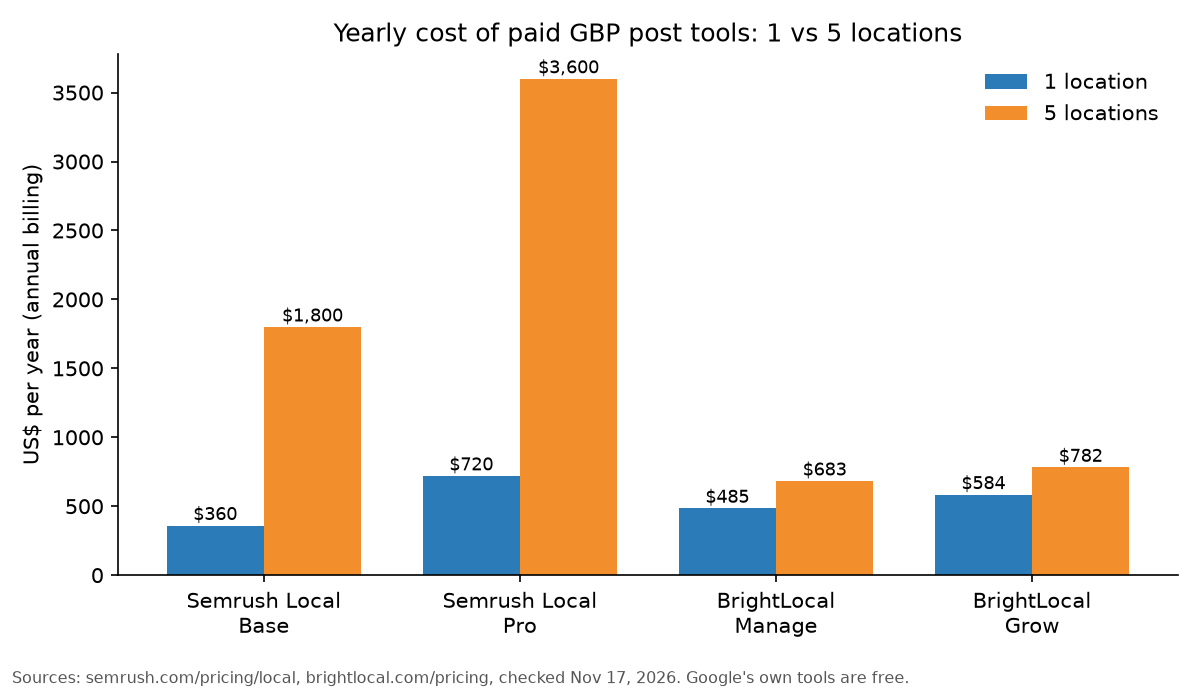 Yearly cost on annual billing. Sources: Semrush Local and BrightLocal pricing pages, checked November 17, 2026.
What the numbers show: Semrush charges per location, so cost scales in a straight line. BrightLocal prices by location band, so at 5 locations its Manage plan works out to about $137 per location per year, less than half of Semrush Base. For a single shop, Semrush Base is the cheapest paid option, and BrightLocal costs 25% less on annual billing than on monthly.
Is it worth it? A simple test: the routine below takes about 20 minutes a month, or roughly 4 hours a year. If your time is worth less than about $90 an hour, Semrush Base ($360 / 4 hours) costs more than doing it yourself. That hourly figure is a threshold to compare against your own, not a measured value.
A caution on full automation: auto-published posts are only as accurate as the tool’s information about you. Review AI posts before leaving any tool on autopilot.
A 20-Minute Monthly Routine
Schedule next month’s four posts, check upcoming holiday hours, upload 3 to 5 new real photos, and reply to any unanswered reviews.
More help: AI receptionists for small business for calls from your profile that go unanswered, our ChatGPT vs Gemini vs Claude vs Copilot comparison for picking a drafting tool, AI for restaurants for menu ideas, and AI for local SEO for the rest of your local search presence.
Next Steps
- List your 15 most common customer questions and make sure each answer appears in your description, services, attributes or website.
- Run the 4-week post prompt and schedule all four posts in one sitting.
- Check each draft with the 60-second post checker above.
- Take 5 real photos this week (exterior, interior, team, work, product) and upload them.
- Try the Gemini connection if you manage only one profile, starting with holiday hours.
- Revisit paid tools only if you manage several locations; use the cost table to compare.
FAQ
How do I use AI to write Google Business Profile posts?
Give a chatbot your business type, city, one real topic per post and the action you want (Book, Call, Learn more). Ask for posts under 100 words with no phone numbers or invented facts. Then add your own photo, check the draft against Google’s rules, and schedule it under Posts, Add post.
Does Google Business Profile have built-in AI?
Yes, in parts. As of November 17, 2026, Google offers an AI “Suggest description” button (select regions and languages), and a Gemini web app connection that can create posts, update hours and menus, and draft review replies for eligible single-profile owners.
Will AI-written posts hurt my ranking?
We found no Google statement that penalizes AI-assisted posts. But Google’s post tips say to avoid “auto-generated or distracting content.” Edit every draft so it’s specific, accurate and clearly about your business.
Can I use AI-generated images on my profile?
Avoid it. Google’s photo guidance says images should have no “excessive use of filters or AI” and should “represent reality.”
What happened to Q&A on my Google listing?
Google discontinued the Q&A API in November 2025 and announced in December 2025 that customers would ask questions in Maps and get AI answers based on your information and reviews. Keep your profile details complete so those answers are right.
Can I put keywords in my business name to rank higher?
No. Google says unnecessary information in your name “isn’t permitted, and could result in the suspension of your Business Profile.”
Sources and Methodology
How we gathered the data: Google rules, features and photo specs come from Google’s own Help Center, developer documentation, official community announcement and blog, read on November 17, 2026. Tool features and prices come from Semrush’s and BrightLocal’s public US pricing pages on the same date. Yearly and per-location costs are our arithmetic (annual-billing monthly price x 12, or the published annual total, divided by locations). The $90-an-hour threshold is a calculation from the 4-hour estimate, not a survey figure. We recheck pricing every 90 days.
- Google Business Profile Help, “Manage your Business Profile description” (AI-powered descriptions): https://support.google.com/business/answer/13682007?hl=en
- Google Business Profile Help, “Guidelines for representing your business on Google”: https://support.google.com/business/answer/3038177?hl=en
- Google Business Profile Help, “Create & manage posts on your Business Profile”: https://support.google.com/business/answer/7342169?hl=en
- Google Business Profile Help, “Business Profile photos, videos & posts content policy”: https://support.google.com/business/answer/7213077?hl=en
- Google Business Profile Help, “Manage your Business Profile photos & videos”: https://support.google.com/business/answer/6103862?hl=en
- Google Business Profile Help, “Tips for business-specific photos on your Business Profile”: https://support.google.com/business/answer/6123536?hl=en
- Google Business Profile Help, “Manage your Business Profile on Google with the Gemini web app”: https://support.google.com/business/answer/17142585?hl=en
- Google Blog, “Save time and grow your business with new Gemini tools” (June 10, 2026): https://blog.google/innovation-and-ai/products/gemini-app/gemini-features-for-businesses/
- Google for Developers, Business Profile APIs deprecation schedule (Q&A API): https://developers.google.com/my-business/content/sunset-dates
- Google Business Profile Community, “A heads up about the upcoming changes to the Q&A feature” (Dec. 3, 2025): https://support.google.com/business/thread/392024106/a-heads-up-about-the-upcoming-changes-to-the-q-a-feature?hl=en
- Google Blog, “How we’re reimagining Maps with Gemini” (Mar. 12, 2026): https://blog.google/products-and-platforms/products/maps/ask-maps-immersive-navigation/
- Semrush, Local Toolkit pricing: https://www.semrush.com/pricing/local/
- Semrush Knowledge Base, Google Business Profile (GBP) Posts (1,500-character limit): https://www.semrush.com/kb/1478-google-business-profile-gbp-posts
- Semrush Knowledge Base, GBP AI Agent: https://www.semrush.com/kb/1605-gbp-ai-agent
- BrightLocal pricing: https://www.brightlocal.com/pricing/
- BrightLocal Help Center, schedule posts with GBP Post Scheduler: https://help.brightlocal.com/hc/en-us/articles/12135851380882-How-can-I-schedule-posts-with-GBP-Post-Scheduler
- BrightLocal Help Center, what’s included in each plan: https://help.brightlocal.com/hc/en-us/articles/12664657783826-What-is-included-in-my-subscription-plan