How to Plan a Month of Social Media Posts With AI (One Hour a Week)
Last updated: November 17, 2026
Here’s how to plan a month of social media posts with AI without it sounding like AI: pick your platforms using real data, draft the whole month’s themes in one prompt, then spend one hour a week turning real photos and customer questions into posts. Most small business owners don’t hate social media. They hate starting from a blank screen at 9 p.m. after a full day of actual work.
AI fixes the blank-screen problem. It won’t fix a missing plan. This guide gives you both: a monthly planning prompt, a repeatable one-hour weekly routine, platform data from Pew Research Center’s 2026 survey, and what the scheduling tools really cost per year (checked November 17, 2026).
Key Takeaways
- Use AI as a drafting assistant, not an autopilot: plan the month’s themes in one prompt, then draft each week from real material.
- Pick platforms by customer age. Per Pew’s 2026 data, Facebook reaches about 2.8 times as many adults 65+ as Instagram (59% vs. 21%), while Instagram leads among 18 to 29 year olds (79% vs. 69%).
- Meta Business Suite is free for scheduling Facebook and Instagram. Buffer’s free plan covers 3 channels; its paid plans cost about $120 a year for 2 channels. Hootsuite starts at $1,188 a year per user.
- At one hour a week, the system takes about 52 hours a year, and you can cut that further with the monthly prompt.
- Use real photos of your work, and label photorealistic AI video or audio where Meta and TikTok require it.
Why a System Beats “Posting When You Remember”
Consistency is hard when posting depends on mood and spare time. A fixed weekly block turns it into a task you can finish, like payroll.
AI helps most at the slow parts: turning a rough idea into a caption, rewriting one post for three platforms, and suggesting hooks. What it can’t supply is the raw material that makes local businesses worth following: your actual work, your team, your customers’ questions and your neighborhood.
So the system below keeps those two jobs separate. You gather the real stuff. AI turns it into posts.
Step 0: Pick Your Platforms Using Real Data (Once)
Don’t try to be everywhere. Pick one or two platforms where your customers already are, and do them well. Pew Research Center’s 2026 survey of US adults (fielded January 30 to June 18, 2026) gives the best public starting point.
| Platform | All US adults | Ages 18-29 | 30-49 | 50-64 | 65+ | Men | Women |
|---|---|---|---|---|---|---|---|
| YouTube | 84% | 95% | 91% | 85% | 65% | 85% | 83% |
| 70% | 69% | 78% | 71% | 59% | 63% | 77% | |
| 51% | 79% | 64% | 41% | 21% | 45% | 56% | |
| TikTok | 37% | 65% | 45% | 31% | 11% | 31% | 43% |
| 31% | 41% | 37% | 32% | 13% | 32% | 30% | |
| Nextdoor | 18% | 10% | 21% | 19% | 18% | 14% | 21% |
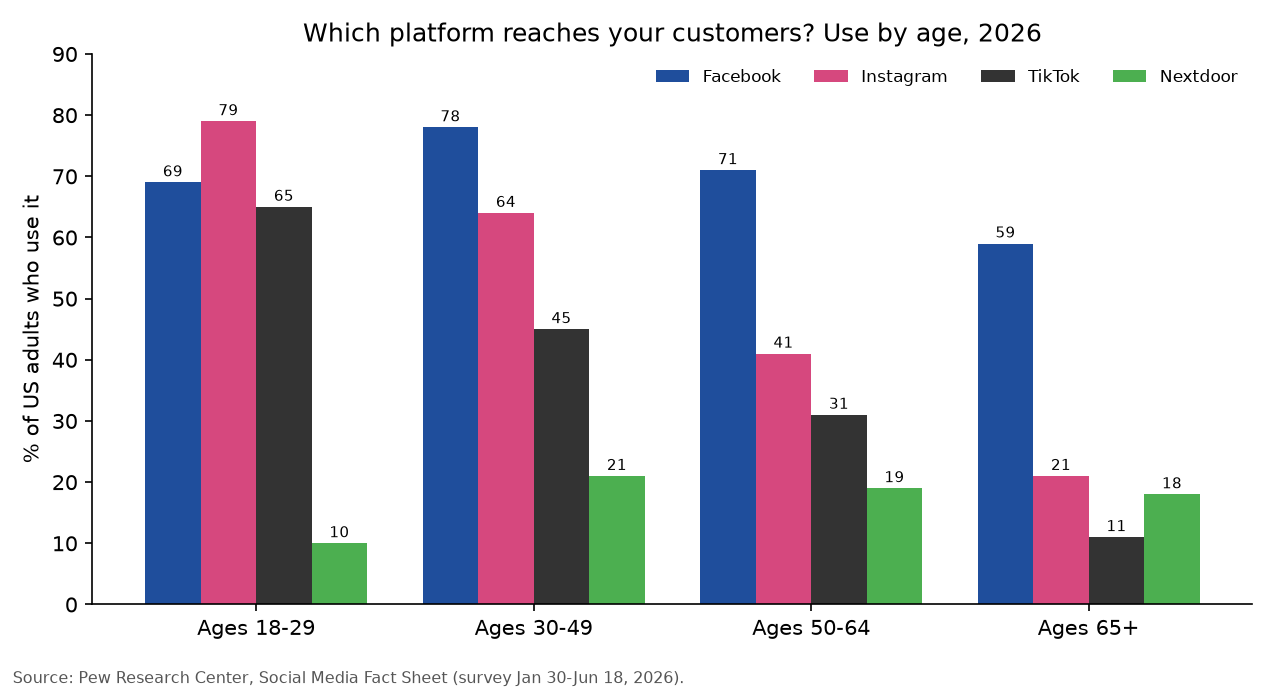 Share of US adults who use each platform, by age. Source: Pew Research Center, Social Media Fact Sheet, 2026.
Our analysis: the “reach ratio” for your customers
Divide one platform’s share by another’s for the age group you serve. Using Pew’s figures:
| Your main customers | Facebook vs. Instagram | Best first choice (posting platforms) |
|---|---|---|
| Ages 18-29 | 69% vs. 79%: Instagram reaches about 1.1x as many | Instagram, then TikTok (65%) |
| Ages 30-49 | 78% vs. 64%: Facebook about 1.2x | Facebook and Instagram are close; pick one |
| Ages 50-64 | 71% vs. 41%: Facebook about 1.7x | |
| Ages 65+ | 59% vs. 21%: Facebook about 2.8x | Facebook, and only Facebook |
Two more patterns from the same data: Nextdoor use rises with income (9% of adults in households under $30,000 vs. 23% at $100,000 or more), which matters for home services in higher-income neighborhoods. And Facebook skews female (77% of women vs. 63% of men), useful for salons, kids’ activities and home decor. YouTube is the biggest of all, but it needs video, so treat it as a second step.
A rough rule of thumb:
- Local service or retail with an older customer base: Facebook first, then your Google Business Profile (not technically social media, but it’s where local searchers land).
- Visual businesses with younger customers (salons, restaurants, boutiques): Instagram first, TikTok if you’re comfortable on video. See our guides to AI for salons and barbershops and AI for restaurants.
- B2B services: LinkedIn plus one other channel.
How to Plan a Month of Social Media Posts With AI: The Monthly Prompt
Once a month (say, the last Friday), spend 15 minutes on this. It gives each week a theme so your weekly hour starts with a plan.
I run [business] in [city]. Customers: [who, including age range].
Platforms: [1-2 platforms]. Posts per week: [2-4].
Next month is [month]. Real things happening: [holidays we
observe, events, closures, new services, seasonal needs].
Only use these offers: [list, or "none"].

Make a 4-week content calendar as a table with columns:
week, theme, post idea, post type (photo / short video /
text graphic), the real photo or clip I should capture, and
call to action. Mix: behind the scenes, answering a customer
question, featured work, and one reminder or event per week.
Don't invent facts, prices, reviews or statistics. Mark
anything I need to confirm with [CHECK].
Print it or save it in your phone’s notes. During the month, capture the photos the calendar asks for as you work.
The One-Hour Weekly System
Block the same hour every week, for example Monday morning. Here’s how to split it.
Minutes 0–10: Collect real material
Open your phone’s camera roll and your messages from the past week. Jot down:
- 3–5 photos or short clips of real work, products, your team or your space
- 1–2 questions customers actually asked
- Anything coming up: a holiday schedule, new service, event or seasonal reminder
- One recent happy customer moment (with their permission if you’ll name or show them)
This list is the “fuel.” Without it, AI will produce generic posts that could belong to any business in the country.
Minutes 10–30: Draft the week with AI
Paste your list into an AI chatbot (ChatGPT, Gemini, Claude or Copilot all work; see our comparison of paid plans). Use a single “master prompt” so you get a whole week at once.
Master prompt (copy and edit):
You are helping me write social media posts for my small business.
Business: [name], a [type of business] in [city].
Audience: [who your customers are].
Voice: [friendly / professional / funny], plain English, no hype,
no hashtags stuffed in, max 2 emojis per post.

Here is this week's real material:
- [photo 1: what it shows]
- [photo 2: what it shows]
- [customer question]
- [upcoming event or schedule change]

Write 4 posts for [Facebook/Instagram] for this week:
1. One "behind the scenes" post
2. One post answering the customer question
3. One post about [event/offer]
4. One post featuring [photo/customer moment]

For each, give a short hook as the first line, a caption under
100 words, and one clear call to action. Do not invent facts,
prices, reviews or statistics. If you need information I didn't
give you, write [CHECK] instead.
The last two lines matter. Chatbots will happily invent a “20% off” deal or a “5-star rated” claim if you don’t stop them.
Repurpose prompt:
Rewrite post #2 three ways: a Facebook version (conversational),
an Instagram caption (shorter, with 3-5 relevant local hashtags),
and a 20-second video script with an on-screen text hook.
Minutes 30–45: Edit and add visuals
Read every draft out loud. Cut anything that sounds like an ad agency, fix every [CHECK] and make sure the details are true.
Then pair each post with a real photo or clip. Free or low-cost design tools help here. Canva Pro, for example, includes AI writing (Magic Write), Magic Resize for reformatting one design for multiple platforms, and built-in social scheduling. Canva’s price varies by region and billing, so check its pricing page for your account.
A few guardrails for visuals:
- Don’t use AI images to show your work, food, products or results. Customers expect the thing in the photo to be the thing they’ll get.
- AI-generated graphics are fine for things like holiday-hours announcements or simple text graphics.
- If you share a photorealistic AI-generated or AI-altered video or image, label it. (More on platform rules below.)
Minutes 45–60: Schedule and set up replies
Load the week’s posts into a scheduler (see the cost table below) and pick times. Most schedulers and Meta Business Suite show when your audience is active.
Use the last few minutes to set yourself a daily reminder for comments and messages. Scheduling saves time, but replies should come from a person. AI can draft them, the same way it can help you respond to Google reviews.
What Scheduling Tools Cost Per Year (Our Comparison)
We compiled list prices from each vendor’s pricing page on November 17, 2026, then worked out the yearly cost for a typical small business using 2 channels (for example, Facebook and Instagram) and 1 user.
| Tool | Free option | Paid pricing (vendor page) | Yearly cost, 2 channels, 1 user | AI features |
|---|---|---|---|---|
| Meta Business Suite | Free | Free (ads cost extra) | $0 | Schedules Facebook and Instagram posts, stories and reels; A/B tests; AI text variations for ads (up to 5, not in all regions or languages) |
| Buffer | 3 channels, 10 scheduled posts per channel, 1 user | Essentials $5 per channel/month billed yearly ($6 monthly); Team $10 ($12 monthly) | $120 (Essentials, yearly) | AI Assistant on all plans, including free |
| Hootsuite | No free plan; 14-day free trial | Standard $99, Professional $199, Advanced $399 per user/month, billed annually | $1,188 (Standard) | Wisdom AI |
| Canva Pro | Free tier exists | Varies by region; check Canva’s pricing page | Check your account | Magic Write, Magic Resize, content scheduling |
What the numbers show: for a 2-channel business, Hootsuite Standard costs about 10 times Buffer Essentials ($1,188 vs. $120 a year), and Meta Business Suite costs nothing if you only use Facebook and Instagram. Hootsuite’s extras (team approvals, inbox, listening) only start to pay off for teams managing many accounts.
Which one to start with:
- Mostly Facebook and Instagram? Start with Meta Business Suite. It’s free and it’s Meta’s own tool.
- Three or fewer channels, including non-Meta ones? Buffer’s free plan may be enough. Upgrade if you need more than 10 queued posts per channel.
- A team managing many accounts with approvals and reporting? That’s where Hootsuite’s pricing starts to make sense.
Is an hour a week worth it?
One hour a week is 52 hours a year. If the monthly prompt cuts your weekly session to 45 minutes, that’s 39 hours, a saving of 13 hours a year. Those are calculations from the routine in this guide, not measured results; time yourself for a month and adjust.
The Rules: AI Labels, Honesty and Your Team
Platform labeling rules
- Meta (Facebook, Instagram, Threads): Meta says it requires people to use its disclosure tool when they post organic content with “a photorealistic video or realistic-sounding audio that was digitally created or altered,” and that it “may apply penalties” if they don’t. Meta also applies “AI info” labels when it detects industry-standard AI signals or when people self-disclose.
- TikTok: TikTok says it requires people to label realistic AI-generated content, and it uses C2PA Content Credentials to detect and label AI content from other platforms.
AI-drafted captions don’t need a label under these policies. The rules focus on realistic synthetic images, video and audio.
Don’t fake social proof
Never have AI write fake customer testimonials or reviews, even as “examples.” The FTC’s rule on consumer reviews and testimonials (16 CFR Part 465) bars businesses from writing or creating testimonials that misrepresent whether the reviewer exists or actually used your service, and that covers AI-written fakes. If you quote a real customer, get their permission.
Give your team rules
If staff help with your social accounts, put AI expectations in writing: what can be drafted with AI, what needs owner approval, and what customer information must never be pasted into a chatbot. Our AI policy template for employees covers this.
A Sample Week (What the Output Looks Like)
Here’s how one week might look for a local business after the one-hour session:
| Day | Post type | Real material behind it |
|---|---|---|
| Monday | Behind the scenes | Photo of the team setting up |
| Wednesday | Answer a customer question | “Do you take walk-ins?” |
| Friday | Featured work or product | Before/after or a new item, shot on your phone |
| Saturday | Event or reminder | Holiday hours graphic |
If four is too many, two good posts beat four generic ones.
Once a month, add 15 minutes to look at what performed best in Meta Business Suite or your scheduler’s analytics. Then tell your AI chatbot: “These three posts got the most comments. Suggest five more ideas in the same style.” This is where AI earns its keep: spotting patterns and suggesting variations faster than you could.
Next Steps
- Pick one or two platforms using the age table and reach ratios above.
- Run the monthly prompt for next month and save the calendar.
- Book a recurring one-hour slot on your calendar for the weekly routine.
- Set up Meta Business Suite or Buffer’s free plan before paying for any scheduler.
- Capture 3 to 5 real photos a week as you work, following the calendar’s shot list.
- Review results monthly and feed your three best posts back into the prompt.
FAQ
How do I plan a month of social media posts with AI?
Give a chatbot your business, customers, platforms, posting frequency and the real events and offers for the month. Ask for a 4-week calendar table with themes, post ideas, the photo to capture and a call to action. Then draft each week’s captions from your real photos and edit them before scheduling.
Is it OK to use AI to write social media posts for my business?
Yes. Meta and TikTok’s labeling rules focus on realistic AI-generated images, video and audio, not AI-assisted captions. Edit the drafts so they’re accurate and sound like you, and never use AI to create fake testimonials or reviews.
What is the best free AI social media tool for small business?
If you mostly post to Facebook and Instagram, Meta Business Suite is free and schedules posts, stories and reels. For mixed platforms, Buffer’s free plan covers three channels with an AI Assistant (as of November 17, 2026).
How often should a small business post on social media?
There’s no universal number. Choose a pace you can sustain every week, such as two to four posts, and adjust based on what your analytics show. Consistency matters more than volume.
Do I have to label AI-generated images on Instagram or Facebook?
Meta requires you to disclose photorealistic video and realistic-sounding audio that was digitally created or altered, and it may label content it detects as AI-generated. For realistic AI images, labeling is the safe, honest choice.
Can AI reply to comments and DMs for me?
AI can draft replies, and some platforms offer automated messaging. Still, have a person review replies, especially to complaints, questions about pricing or anything sensitive. An AI that answers calls and books appointments is a different tool; see our guide to AI receptionists.
Sources and Methodology
How we gathered the data: Platform usage figures come from Pew Research Center’s Social Media Fact Sheet (survey of US adults fielded January 30 to June 18, 2026), read November 17, 2026. The reach ratios are our own division of Pew’s published percentages. Tool prices and features come from each vendor’s pricing and help pages on the same date; yearly costs are our arithmetic (per-channel or per-user price x 12). Time figures are calculations from the routine described here, not measured results. Labeling rules come from Meta’s and TikTok’s own newsrooms.
- Pew Research Center, “Social Media Fact Sheet” (2026): https://www.pewresearch.org/internet/fact-sheet/social-media/
- Meta Business Help Center, “How Meta Business Suite works”: https://www.facebook.com/business/help/205614130852988
- Meta Business Help Center, “How to create an ad with text generation”: https://www.facebook.com/business/help/497610041230617
- Meta Newsroom, “Labeling AI-Generated Images on Facebook, Instagram and Threads” (Feb 2024): https://about.fb.com/news/2024/02/labeling-ai-generated-images-on-facebook-instagram-and-threads/
- Meta Newsroom, “Our Approach to Labeling AI-Generated Content and Manipulated Media” (updated 2024): https://about.fb.com/news/2024/04/metas-approach-to-labeling-ai-generated-content-and-manipulated-media/
- TikTok Newsroom, “More ways to spot, shape, and understand AI-generated content”: https://newsroom.tiktok.com/en-us/more-ways-to-spot-shape-and-understand-ai-generated-content
- Buffer, Pricing: https://buffer.com/pricing
- Hootsuite, Pricing: https://www.hootsuite.com/pricing
- Hootsuite, Wisdom AI (formerly OwlyWriter): https://www.hootsuite.com/platform/owly-writer-ai
- Canva, Canva Pro: https://www.canva.com/pro/
- Canva, Magic Studio: https://www.canva.com/magic/
- Canva, Pricing: https://www.canva.com/pricing/
- eCFR, 16 CFR Part 465, “Use of Consumer Reviews and Testimonials”: https://www.ecfr.gov/current/title-16/chapter-I/subchapter-D/part-465