How to Use AI to Respond to Google Reviews (Fast, Personal, and Without Sounding Like a Robot)
Last updated: November 17, 2026
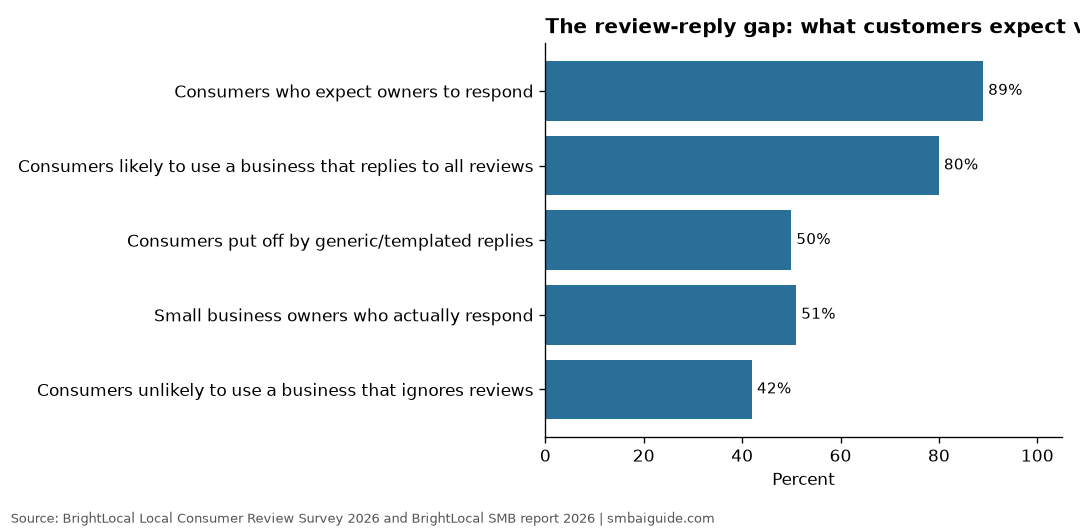
Your customers are reading your replies. In BrightLocal’s 2026 Local Consumer Review Survey, 89% of consumers said they expect business owners to respond to reviews. But BrightLocal’s separate 2026 small business marketing report found that only about half (51%) of business owners actually respond.
The usual reason is time. AI can fix that if it drafts and you decide, because BrightLocal also found that generic or templated responses make 50% of consumers unlikely to choose a business. Below is how to use AI to respond to Google reviews without sounding like a robot: the workflow, copy-paste prompts, Google’s own rules, the time and cost math, and the tools (including Google’s Gemini) that now draft replies for you.
Key Takeaways
- Paste the review and a short brand-voice note into any AI chatbot, ask for a 2–4 sentence reply with one specific detail and no promises, then edit, sign and post.
- For 1–2 star reviews, check the facts in your records first and move the conversation offline.
- The gap is real: BrightLocal’s 2026 data shows 89% of consumers expect a reply but only 51% of owners respond, and 50% of consumers are put off by generic replies.
- If you manage one verified Business Profile with a personal Google account, the Gemini web app can connect to it and draft replies at no listed extra cost.
- By our math, a paid tool (Semrush Local from $360/yr, BrightLocal from $584/yr) is worth it mainly at high volume or multiple locations.
Why Replying to Reviews Is Worth Your Time
The numbers below come from BrightLocal’s 2026 Local Consumer Review Survey of US consumers:
- 80% say they’re likely to use a business that responds to all of its reviews.
- 42% say they’re unlikely to use a business that ignores its reviews.
- 19% expect a reply the same day, and 81% expect one within a week.
- Fewer consumers are likely to use a business that answers only positive reviews (45%) or only negative ones (47%).
The takeaway: reply to everything, reply fast, and sound like a person.
What Google Itself Says About Replying to Reviews
For all replies:
- Be professional and polite. Replies have to follow Google’s content policies, just like reviews do.
- Keep it short and simple. People may stop reading a long reply before they reach the point.
- Make your replies count. Don’t send the same “thank you” to everyone. Share a helpful update or answer a question.
- Be conversational, not promotional. Reviewers are already customers, so don’t use replies to push deals or promotions.
For negative reviews:
- Protect privacy and avoid personal attacks. Never share a reviewer’s private information. For complicated issues, ask them to contact you by phone or email.
- Be honest and explain limitations. Admit mistakes, but don’t take responsibility for things outside your control.
- Apologize when appropriate, and show empathy.
- Personalize. Address the reviewer by name, respond to their specific feedback, and sign off with your name or initials.
- Respond in a timely manner.
Mechanics: you must verify your business to reply; Google checks replies against its policies (usually up to 10 minutes, sometimes up to 30 days); replies appear as the business; and the reviewer is notified and can still edit their review.
The numbers behind replying: the gap, the time, and the tool cost
The expectation gap. Put BrightLocal’s two 2026 studies side by side and the opportunity is obvious: 89% of consumers expect a reply, but only about half of owners send one.
The time math (our assumptions, not measured results). Say a careful reply written from scratch takes about 5 minutes, and an AI-drafted reply you fact-check and edit takes about 2. Swap in your own timings:
| Reviews per month | Writing every reply yourself | AI draft + your edit | Time saved per month |
|---|---|---|---|
| 10 | 50 min | 20 min | 30 min (~0.5 hrs) |
| 30 | 150 min | 60 min | 90 min (~1.5 hrs) |
| 60 | 300 min | 120 min | 180 min (~3.0 hrs) |
At 10 reviews a month, AI saves about half an hour, so a free chatbot is plenty. At 60, it frees up about 3 hours, which is where a paid tool that pulls reviews into one inbox starts to make sense.
What the paid options cost per year (one location, list prices from vendor pages):
| Option | Monthly | Per year |
|---|---|---|
| Free chatbot + the prompts below, or Gemini web app connected to one Business Profile | $0 | $0 |
| Semrush Local Base (GBP AI Agent auto-replies) | $30, billed annually | $360 |
| Semrush Local Pro | $60, billed annually | $720 |
| BrightLocal Grow, billed monthly | $65 | $780 |
| BrightLocal Grow, billed annually | about $49 | $584 |
| Birdeye, Podium | Quote only | Quote only |
Our takeaway: one location getting fewer than about 30 reviews a month doesn’t need a paid tool for replies alone. Paid tools earn their keep through multiple locations, review requests and alerts, not drafting.
How to Use AI to Respond to Google Reviews: The 5-Minute Workflow
- Collect the review. Copy the reviewer’s first name, the star rating, and the full text.
- Check the facts (required for 1–3 stars). Look up the order, appointment or job in your records. AI can’t know what actually happened.
- Paste your brand-voice note and the review into your AI tool (see the prompts below).
- Edit the draft. Delete anything the AI invented, such as a staff name, a menu item, a refund, or a “we’ve retrained our team” line that isn’t true.
- Sign it and post it from your Business Profile: Read reviews → Reply → enter your reply → Reply.
- Log recurring complaints. Once a week, ask AI to summarize the top praise and complaint themes, then fix one thing.
Write a “brand voice” note once and reuse it
Save this in a note and paste it at the start of every prompt:
BRAND VOICE: We are [Business Name], a [type of business] in [city].
Tone: warm, plain-spoken, a little casual. No corporate phrases like
"we value your feedback" or "we apologize for any inconvenience."
Sign replies as "[Your first name], owner."
Never offer discounts, refunds, or freebies in a public reply.
Never mention customer details beyond what the reviewer wrote.
Keep replies under 80 words.
Copy-Paste AI Prompts for Every Type of Review
Prompt 1: Positive reviews (4–5 stars)
[Paste BRAND VOICE note]

Write a reply to this 5-star Google review from [first name]:
"[paste review]"

Rules:
- 2–3 sentences.
- Thank them by first name.
- Mention ONE specific thing they praised, in different words than they used.
- Optionally share one small, true detail that adds value
  (e.g., a seasonal item, a related service). Do not make a sales pitch.
- Do not invent facts that aren't in the review or my notes: [optional notes].
- Give me 3 variations with different openings.
Prompt 2: Neutral or mixed reviews (3 stars)
[Paste BRAND VOICE note]

Write a reply to this 3-star Google review from [first name]:
"[paste review]"

What actually happened / context from our side: [your notes].
What we're changing, if anything (only if true): [your notes].

Rules:
- 3–4 sentences.
- Thank them and acknowledge what they liked, specifically.
- Acknowledge the criticism directly without getting defensive.
- If we made a change, mention it briefly. If not, don't imply one.
- No discounts, no promises.
- End with a low-pressure invitation to come back or reach out.
Prompt 3: Negative reviews (1–2 stars)
[Paste BRAND VOICE note]

Write a reply to this [1/2]-star Google review from [first name]:
"[paste review]"

Facts from our records: [what you verified].
What we're willing to do (to be offered privately, not in the reply): [notes].
Contact method to share: [phone/email].

Rules:
- 3–5 sentences, calm and human.
- Apologize for the experience if we were at fault; if partly outside
  our control, say so honestly and briefly without blaming the customer.
- Do NOT reveal any private details (order numbers, appointment info,
  health info, addresses).
- Do NOT argue or dispute their account point by point.
- Invite them to contact [name] directly at [phone/email] to make it right.
- Sound like a person, not a legal department.
Prompt 4: The “de-robot” pass
Use this when a draft still sounds machine-written:
Rewrite this reply so it sounds like a busy small-business owner typed
it on their phone: shorter sentences, contractions, no clichés like
"we're thrilled," "valued customer," or "rest assured." Keep all facts
unchanged. Under 60 words.

"[paste draft]"
When NOT to Let AI Write the Reply
AI drafts are fine for most reviews. Write these replies yourself, or check them carefully:
- Health, safety, discrimination or legal threats. Talk to your attorney or insurer before posting anything.
- Anything involving private details, especially in healthcare, where patient privacy laws apply.
- Refunds, chargebacks or compensation. Handle them privately, not in a public reply.
- Reviews you think are fake or break policy. Flag them through Google’s reporting process. Don’t argue in public.
One legal note: AI should never be used to write reviews about your own business. The FTC’s rule on consumer reviews and testimonials, effective October 2024, bans fake reviews, including AI-generated reviews that misrepresent who wrote them. It also bans certain kinds of review suppression.
Tools That Offer AI Review Replies (Checked Nov 17, 2026)
A free chatbot plus the prompts above covers most small businesses. High review volume or multiple locations? These tools put drafting and posting in one place.
| Tool | What the AI does | Price (from vendor pages, checked Nov 2026) |
|---|---|---|
| Gemini web app + Google Business Profile | Connects to your profile; retrieves reviews, drafts or deletes replies, summarizes feedback themes | Gemini app connection; Google lists no separate fee for the feature. Eligibility limits apply (see below) |
| Semrush Local | Local Base: “GBP AI Agent” auto-replies to new Google reviews in your chosen tone and language. Local Pro: AI reply drafts or auto-replies, review alerts, review generation | Base $30/mo per location; Pro $60/mo per location (billed annually) |
| BrightLocal (Grow plan) | “Generate AI Response” button in Reputation Manager (up to 3 drafts per review per 24 hours); reply templates; replies to Google and Facebook in-app | 1 location: $65/mo billed monthly, or $584/yr (~$49/mo) |
| Birdeye | “Review Response Agent” drafts replies from context. Can auto-publish 4- and 5-star replies while holding 1- and 2-star ones for approval; rules by location and rating | Not listed publicly; quote by location count |
| Podium | “AI Reputation Specialist” within its AI Employee; review invites and responses from one inbox | Custom quote; no public prices |
Does Google Business Profile itself offer AI reply suggestions?
Partly. Here’s what we could confirm as of November 2026:
- Gemini integration (officially documented). In June 2026, Google announced that you can connect your Business Profile to the Gemini app. You can then ask it, for example, “help me respond to my latest review,” and get a draft that refers to that customer’s feedback. Google’s Help Center says Gemini can draft or delete review replies, summarize review themes, update hours and create posts. Requirements: – You must be an owner or manager of only one verified Business Profile. – You must be 18 or older. – You must be signed in to the Gemini web app (gemini.google.com) with a personal Google Account, not a work or school account. – Keep Activity must be turned on. – Google’s announcement said the rollout excludes the EEA and UK.
- “Reply to reviews with AI” inside the Business Profile dashboard (limited test). In March 2026, Search Engine Land reported that Google was testing a button that generates suggested replies you can edit before posting. Availability varied from account to account. We did not find this feature documented as generally available in Google’s Help Center, so you may or may not see it.
Managing several locations or using a Workspace account? The Gemini connection isn’t available to you yet; use a chatbot or paid tool.
A word on auto-replies
Auto-posting is reasonable for 5-star, no-text reviews. For anything negative, require human approval first (Birdeye, for example, offers exactly that split). An automated reply that misses the point of a complaint does more harm than no reply.
Next steps
- Write a three-line brand-voice note (tone, how you sign off, what you never promise) and save it where you can paste it.
- Open your Business Profile, sort reviews by newest, and reply to the last 10 using the workflow and prompts above.
- Set a weekly 15-minute slot to reply to new reviews; 81% of consumers expect a reply within a week.
- If you manage one profile with a personal Google account, try connecting it to the Gemini web app and compare its drafts with your chatbot’s.
- Once a month, ask AI to summarize praise and complaint themes, and fix one recurring issue.
- Never use AI to write reviews of your own business or offer incentives for positive ones; the FTC’s 2024 rule bans both.
Related reading: AI for Restaurants: Practical Ways Small Restaurants Use AI for Ordering, Staffing, Menus and Marketing; AI for Salons and Barbershops: Booking, No-Show Reduction and Social Content; AI and Customer Data Privacy: What Small Businesses Can Safely Paste Into a Chatbot.
FAQ
Is it OK to use AI to reply to Google reviews?
We found nothing in Google’s documentation banning AI-assisted replies, and Google’s own Gemini integration drafts them. Replies must still follow Google’s content policies, so edit before you post.
Will customers know my reply was written by AI?
They might if it’s generic. BrightLocal found that templated or generic replies put off 50% of consumers. Mention specific details, use short sentences and sign your name, and the reply will read as yours.
Should I reply to every review, even 5-star ones with no text?
Consumer survey data says yes: 80% are likely to use a business that responds to all reviews. Google’s own tips suggest focusing on replies that add something. A short, varied thank-you covers both.
Can I offer a discount in my reply to an unhappy customer?
Google advises against using replies to promote deals. Make any make-good offer privately by phone or email, and keep the public reply focused on listening and fixing the problem.
Can AI help me get more reviews, too?
Yes. AI can draft review-request texts and emails to send with Google’s review link or QR code. Never use AI to write reviews yourself, and never offer incentives for positive ones. The FTC’s rule prohibits both.
How much time does AI save on review replies?
It depends on your volume and how much editing you do. Using our assumption of 5 minutes per reply written from scratch vs. 2 minutes for an AI draft you check, 30 reviews a month saves about 1.5 hours. Time yourself on 10 replies each way to get your own number.
Sources and methodology
How we gathered this. Consumer and owner statistics come from BrightLocal’s 2026 Local Consumer Review Survey and its 2026 small business report, quoted as published. Google’s reply guidelines and the Gemini integration requirements come from Google Business Profile Help pages and Google’s June 10, 2026 blog post, rechecked November 17, 2026. Tool prices come from each vendor’s pricing page, first checked November 2, 2026. The time table uses our own assumed minutes per reply (5 manual, 2 AI-assisted). Those are illustrative, not measured. The annual cost table is list price × 12. We have not tested these tools hands-on. No affiliate links.
Sources
- BrightLocal, Local Consumer Review Survey 2026: https://www.brightlocal.com/research/local-consumer-review-survey/
- BrightLocal, “Are small businesses getting enough reviews?”: https://www.brightlocal.com/research/smb-report-enough-reviews/
- Google Business Profile Help, “Manage customer reviews”: https://support.google.com/business/answer/3474050?hl=en
- Google Business Profile Help, “Tips to get more reviews” (incl. tips to write better review replies): https://support.google.com/business/answer/3474122?hl=en
- Google Business Profile Help, “Manage your Business Profile on Google with the Gemini web app”: https://support.google.com/business/answer/17142585?hl=en
- Google Blog, “Save time and grow your business with new Gemini tools” (June 10, 2026): https://blog.google/innovation-and-ai/products/gemini-app/gemini-features-for-businesses/
- Search Engine Land, “Google Business Profile tests AI-generated replies to reviews” (March 20, 2026): https://searchengineland.com/google-business-profile-test-reply-to-reviews-with-ai-472167
- Semrush, Local Toolkit pricing: https://www.semrush.com/pricing/local/
- Semrush Knowledge Base, Semrush Local Pricing and Plans: https://www.semrush.com/kb/1611-pricing-and-plans
- Semrush Knowledge Base, Review Management: https://www.semrush.com/kb/1392-review-management
- BrightLocal pricing: https://www.brightlocal.com/pricing/
- BrightLocal Help Center, responding to reviews in Reputation Manager: https://help.brightlocal.com/hc/en-us/articles/203604998-Can-I-respond-to-reviews-through-a-Reputation-Manager
- Birdeye, Review Response Agent: https://birdeye.com/review-response-agent/
- Birdeye pricing: https://birdeye.com/pricing/
- Podium Reviews: https://podium.com/product/reviews/
- Podium pricing: https://www.podium.com/getpricing
- Federal Register, FTC Trade Regulation Rule on the Use of Consumer Reviews and Testimonials (Aug. 22, 2024): https://www.federalregister.gov/documents/2024/08/22/2024-18519/trade-regulation-rule-on-the-use-of-consumer-reviews-and-testimonials