AI for HVAC and Plumbing Businesses: Practical Workflows That Save Hours Every Week
Last updated: November 17, 2026
Your techs can braze a line set in a crawlspace in August. Nobody should have to retype their scribbled job notes into an invoice at 9 p.m.
That’s the real opportunity with AI for HVAC and plumbing shops. It won’t diagnose a cracked heat exchanger. What it can do is handle the office work that eats your evenings: missed calls, estimate write-ups, invoice notes, review replies, maintenance-agreement reminders and job ads. So how can a small HVAC or plumbing company use AI without wasting money? This guide covers seven workflows you can start this week, with copy-and-paste prompts, current pricing for the trade-specific tools (rechecked November 17, 2026), and the break-even math.
Key Takeaways
- Biggest win: stop losing after-hours and on-the-job calls. On Jobber or Housecall Pro, turn on their AI call answering first (Jobber Receptionist: $29/month for 30 conversations, then $0.79 each; Housecall Pro CSR AI: quote-based).
- Cheapest win: a $20/month assistant (ChatGPT Plus or Claude Pro), or the Gemini/Copilot in your Google or Microsoft plan, turns tech notes into clean invoices, estimates and emails.
- Break-even math: even 200 AI-answered conversations a month on Jobber ($163.30) is paid for by one recovered job if your gross profit per job is around $250 (our assumption).
- Never outsource to AI: load calculations, code compliance, refrigerant handling, gas or electrical safety calls, or final prices.
How a small HVAC or plumbing company can use AI: start with the office
The trades are busy, and good help is scarce. The Bureau of Labor Statistics projects HVAC mechanic and installer jobs to grow 11% from 2025 to 2035, “much faster than the average,” with about 40,600 openings a year (BLS). BLS also notes that HVAC techs “must maintain complete records of work performed, including the amount of time it took and specific parts and equipment that were used.” That record-keeping is exactly what AI is good at speeding up.
Small shops are also early in the curve. The Census Bureau’s Business Trends and Outlook Survey found AI use didn’t change significantly among firms with fewer than 20 employees between December 2025 and May 2026, while it grew at larger firms (Census Bureau). The bigger competitors are adopting. You don’t need to match their budget, just their response time.
The math: what AI call answering costs vs. what one missed job is worth
Here’s the arithmetic for the most common starting point, Jobber’s Receptionist add-on, using Jobber’s published pricing ($29/month for 30 conversations, then $0.79 each). If you’re not on Jobber, a standalone option like Goodcall ($79 for 100 unique callers) prices out similarly at higher volumes.
| AI conversations per month | Jobber Receptionist monthly cost |
|---|---|
| 30 | $29.00 |
| 60 | $52.70 |
| 100 | $84.30 |
| 150 | $123.80 |
| 200 | $163.30 |
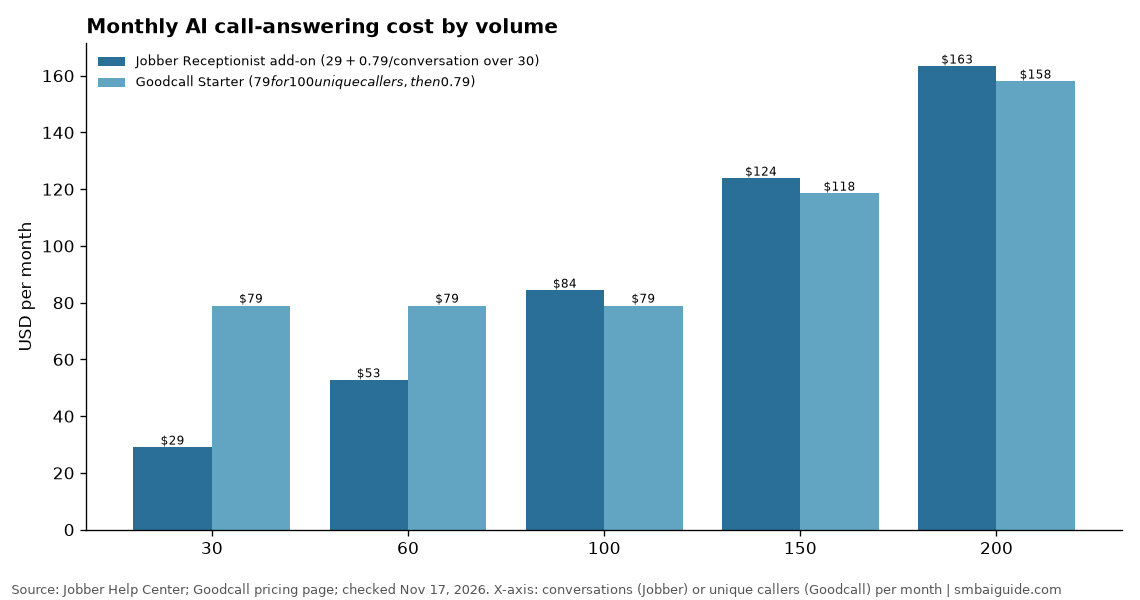
Break-even in one line: monthly cost ÷ your average gross profit per job = jobs per month the AI has to save. For example (an assumption, not a benchmark), if a typical repair call leaves you $250 gross profit after parts and labor, even the 200-conversation bill ($163.30) is covered by one recovered job a month (163.30 ÷ 250 ≈ 0.65).
Office-time math (our assumption): if AI cuts the time to turn tech notes into an invoice summary from about 8 minutes to 3, a shop closing 40 jobs a week saves about 200 minutes, or 3.3 hours, a week. Time yourself on 10 invoices before and after to get your real number.
Why the office side matters in this trade: BLS projects HVAC mechanic and installer employment to grow 11% from 2025 to 2035, with about 40,600 openings a year. Hiring is hard, so office hours saved are often easier to win than another tech.
Workflow 1: Answer every call, even from a rooftop
Missed calls are missed jobs in this trade. A no-heat call that goes to voicemail usually goes to the next company on Google.
Option A: Use your field-service software’s AI.
- Jobber Receptionist answers calls and texts 24/7, can book jobs into your schedule using your online-booking settings, create requests, and escalate calls containing words you choose (“gas smell,” “flooding,” “emergency”) by text or live transfer. It’s included on Jobber’s Plus plan or available as an add-on for $29/month with 30 conversations, then $0.79 each. It requires a Jobber dedicated phone number, though you can forward your existing number (Jobber Help Center, updated Oct 28, 2026).
- Housecall Pro CSR AI answers calls, summarizes them, flags urgency, and can book, reschedule or cancel jobs if you allow it. It has separate after-hours rules and always-on emergency handling (Housecall Pro Help Center). Housecall Pro lists 24/7 call answering as a paid add-on (“CSR AI sold separately”). We couldn’t find a public price, so get a quote (Housecall Pro).
- ServiceTitan builds its AI, called Atlas, into the platform for reporting, dispatch and field lookups like equipment history. ServiceTitan pricing is quote-based (ServiceTitan).
Option B: A standalone AI receptionist. If your software doesn’t offer one, see our AI receptionist comparison for real prices on Rosie, Goodcall, Dialzara, Smith.ai and others.
Set it up right: 1. Write your emergency triggers first: gas odor, CO alarm, no heat with vulnerable occupants, active leak, sewage backup. 2. Route those to a live on-call number, never to “we’ll call you back.” 3. Tell the AI exactly what it may say about price (“Our diagnostic fee is $X; the tech will quote repairs on site”) and what it may not. 4. Test it yourself from a cell phone, after hours, pretending to be an angry customer.
Workflow 2: Turn tech notes into clean invoices and job summaries
Techs write “replcd cap 45/5 cond fan motor noisy rec replace, cust declined.” Customers (and your future self) need more than that.
Prompt:
You are the office manager for an HVAC company. Rewrite these technician
notes into (1) a customer-facing invoice description in plain English,
2–4 sentences, and (2) an internal note listing parts used and any
declined recommendations. Do not add any work that isn't in the notes.
Do not invent part numbers or prices.

Notes: [paste]
The last two lines matter. AI models can “fill in” plausible details, so tell them not to, and have someone glance at the result before it goes out.
Tip: Ask techs to dictate notes as a voice memo in the truck. Most AI apps can transcribe and clean them up.
Once invoices are out, the AI features in accounting software can help with categorizing and reconciling payments. See our AI bookkeeping tools comparison.
Workflow 3: Faster, clearer estimates and replacement proposals
AI can’t size a system. ACCA’s Manual J is the recognized standard for residential load calculations (ACCA), and that work belongs in proper software and with your comfort advisor. Where AI does help is turning your numbers into a proposal homeowners can understand.
Prompt:
Create a good/better/best replacement proposal for a homeowner.
Use ONLY these details: [equipment options, efficiency ratings, prices,
warranty terms, financing terms, install timeline from our price book].
For each option write: a one-line summary, 3 bullet benefits, and
what's included. Then a short paragraph explaining why the home needs
replacement, based on: [tech findings]. Reading level: 8th grade.
No pressure language. No claims about energy savings unless I gave a number.
For plumbing, swap in water heater options (tank vs. tankless), repipe scopes or sewer-line repair methods.
Workflow 4: Maintenance agreement reminders that actually get booked
Service agreements smooth out the seasonal roller coaster. AI can write a full season of reminders in minutes.
Prompt:
Write a 3-message reminder sequence for our fall furnace tune-up plan
members: (1) SMS under 300 characters, (2) email with a booking link
placeholder [LINK], (3) a final SMS 7 days later. Friendly, local,
no scare tactics. Mention: [what the tune-up includes]. Company: [name], [city].
Then load them into your field-service software’s marketing or automation tools. Housecall Pro, for example, includes a “Marketing AI” assistant for emails and service descriptions in all plans (Housecall Pro).
Compliance note: Texting customers for marketing has consent rules under the federal Telephone Consumer Protection Act. Make sure your customers opted in to texts.
Workflow 5: Reply to every Google review in a few minutes a week
Prompt:
Draft a reply to this Google review for [company], an HVAC/plumbing
company in [city]. Under 80 words. Thank them by first name, mention the
specific service they mentioned, and sound like a local owner, not a
corporation. If the review is negative: apologize once, don't argue, don't
share any job details publicly, and invite them to call [owner name] at [number].

Review: [paste]
Hard line: Never use AI to write reviews or post fake ones. The FTC’s rule on consumer reviews, in effect since October 2024, bans fake reviews, including AI-generated ones, and allows civil penalties (FTC rule, Federal Register).
Workflow 6: Hiring ads and onboarding checklists
With steady demand for techs, your job post competes with every other shop in town.
Prompt:
Write a job post for a [Residential HVAC Service Technician / Journeyman
Plumber] in [city, state]. Pay range: [$X–$Y/hr]. Schedule: [details incl.
on-call rotation]. Benefits: [list]. Requirements: [EPA 608 / state license /
driver's license]. Make it honest and specific; no clichés like "rockstar."
Add a short "what your first 90 days look like" section.
Then ask the same chat to build a first-week onboarding checklist: truck stock, safety gear, software logins, ride-along schedule. Always state pay ranges honestly. Some states and cities require them in job posts.
Workflow 7: Customer explanations that cut repeat calls
A lot of phone time goes to “why is my AC dripping?” or “what’s a P-trap?” Have AI draft short, plain-English explainers for your website FAQ, then have your most experienced tech fact-check every one.
Prompt:
Write a 150-word homeowner explainer: "Why is water pooling around my
furnace?" List common causes in plain English, what's safe for a homeowner
to check (e.g., condensate line visible clog), and when to call a pro.
Include a safety line about gas appliances. Do not give repair instructions
involving gas, refrigerant or electrical panels.
Which AI tools should an HVAC or plumbing shop pay for? (prices checked Nov 17, 2026)
| Need | Tool | Price (vendor-published) |
|---|---|---|
| AI call answering inside your FSM software | Jobber Receptionist | $29/mo add-on (30 conversations, then $0.79 each); included on Plus plan |
| Housecall Pro CSR AI | Paid add-on; price not published, quote required | |
| General writing, estimates, notes | ChatGPT Plus / Claude Pro | $20/mo each (Claude Pro $17/mo billed annually) |
| AI in your email and docs | Google Workspace Business Standard (Gemini) | $14/user/mo list (new customers: up to 50% off the first 3 months, as of Nov 17, 2026) |
| Microsoft 365 Copilot Business add-on | $18/user/mo first-year promo on annual plans bought by 12/31/26 (requires an eligible Microsoft 365 business plan); regular $21 | |
| Standalone AI phone answering | Rosie, Goodcall, Dialzara, etc. | Paid entry tiers about $29–$79/mo (some have free tiers); see our receptionist guide |
Sources: Jobber, Housecall Pro, ChatGPT, Claude, Google Workspace, Microsoft. For a full breakdown, see ChatGPT vs Gemini vs Claude vs Copilot.
Guardrails every trade shop needs
- No safety decisions by AI. Gas leaks, CO, electrical hazards and refrigerant handling are for licensed humans. EPA requires nearly all HVAC techs to be certified in refrigerant handling (BLS). A chatbot isn’t.
- No invented numbers. Prices, warranties and efficiency claims come from your price book and manufacturer docs, not the AI.
- Protect customer data. Don’t paste card numbers, alarm codes or lockbox codes into a chatbot. On personal plans, turn off model training in settings.
- A human reviews anything sent to customers for the first month, until you trust the output.
Next steps
- Pull last month’s missed-call count from your phone system or FSM software.
- If you use Jobber or Housecall Pro, turn on (or get a quote for) their AI call answering and write your emergency trigger words before it goes live.
- Run the break-even line above with your own average gross profit per job.
- Pick one office workflow (tech notes to invoice summaries is the easiest) and use the prompt from Workflow 2 on next week’s jobs.
- Load a season of maintenance-agreement reminders, and confirm customers opted in to marketing texts.
- Review every customer-facing AI draft for the first month, then spot-check weekly.
Frequently asked questions
Can AI do a Manual J load calculation for me?
Don’t rely on a general chatbot for that. ACCA’s Manual J is the recognized standard for residential load calculations, and it needs accurate inputs and purpose-built software. Use AI to explain the results to homeowners, not to produce them.
What’s the best AI receptionist for a plumbing or HVAC company?
If you already use Jobber or Housecall Pro, start with their built-in AI answering, because it can book directly into your schedule. If not, compare standalone options by included calls or minutes, emergency transfer features and calendar integration in our AI receptionist guide.
How much does AI cost for a small HVAC company?
Many shops can start for $0–$30 a month: a free or $20 AI assistant, plus an AI receptionist add-on like Jobber’s at $29/month. Costs rise with call volume and team size.
Will customers be upset talking to an AI on the phone?
Be upfront. Housecall Pro says its CSR AI introduces itself as AI, and Jobber encourages telling callers they’re speaking with AI. Always offer a fast path to a human for emergencies.
Is it legal to use AI to text my customers?
Generally yes for service updates. Marketing texts carry consent requirements under federal and state rules. Get opt-in at booking and include opt-out instructions. When in doubt, ask your attorney.
How many recovered jobs does an AI receptionist need to pay for itself?
Usually one or fewer per month. Divide the monthly cost by your average gross profit per job: at an assumed $250 gross profit, Jobber’s add-on at 100 conversations ($84.30) needs about a third of a job a month to break even.
Sources and methodology
How we gathered and calculated this. Tool features and prices come from vendor help and pricing pages (Jobber, Housecall Pro, ServiceTitan, OpenAI, Anthropic, Google, Microsoft, Goodcall), first checked November 2, 2026; Jobber, Goodcall, Google Workspace and Microsoft Copilot pricing were rechecked November 17, 2026. Labor-market figures are from the BLS Occupational Outlook Handbook. The cost-by-volume table and chart are our arithmetic from published rates; gross profit per job and minutes per invoice are labeled assumptions, not measured data. We have not tested these tools hands-on. No affiliate links.
Sources
- U.S. Bureau of Labor Statistics, Occupational Outlook Handbook – HVAC Mechanics and Installers: https://www.bls.gov/ooh/installation-maintenance-and-repair/heating-air-conditioning-and-refrigeration-mechanics-and-installers.htm
- U.S. Census Bureau, “Large Firms With at Least 20 Employees Biggest AI Users” (May 2026): https://www.census.gov/library/stories/2026/05/ai-use-businesses.html
- Jobber Help Center – Receptionist powered by Jobber AI: https://help.getjobber.com/en/articles/receptionistpowered-by-jobber-ai/
- Housecall Pro Help Center – CSR AI Overview: https://help.housecallpro.com/en/articles/9740104-csr-ai-overview
- Housecall Pro – AI Team: https://www.housecallpro.com/features/ai-team/
- ServiceTitan – Meet Atlas: https://www.servicetitan.com/guides/ai-automation-playbook/ai-chief-of-staff
- ACCA – Manual J Residential Load Calculation: https://www.acca.org/standards/technical-manuals/manual-j
- Federal Register – FTC Trade Regulation Rule on the Use of Consumer Reviews and Testimonials (16 CFR Part 465): https://www.federalregister.gov/documents/2024/08/22/2024-18519/trade-regulation-rule-on-the-use-of-consumer-reviews-and-testimonials
- ChatGPT Learn – Pricing: https://learn.chatgpt.com/docs/pricing
- Claude pricing: https://claude.com/pricing
- Google Workspace pricing: https://workspace.google.com/pricing
- Microsoft Copilot business pricing: https://www.microsoft.com/en-us/copilot/pricing/business
- Goodcall – Pricing: https://www.goodcall.com/pricing