AI for Landscaping and Lawn Care Companies: Quotes, Routes and Seasonal Marketing
Last updated: November 17, 2026
In landscaping, the work is outside but the bottlenecks are inside: measuring properties for bids, rebuilding routes every time a crew calls in sick, returning calls at 8 p.m., and remembering to market aeration before your competitors do.
AI can take a real bite out of that office work. It can’t mow a lawn or tell you what to spray. So how can a lawn care business use AI without wasting money? This guide covers where AI for a landscaping business actually helps in 2026, which tools offer it, what they cost per year (checked on vendor pages in November 2026), when a measurement tool pays for itself, and where to keep a human in charge.
Key Takeaways
- Quoting: aerial measurement tools such as SiteRecon (from $39/month) and Aspire’s PropertyIntel measure properties from imagery; Jobber can auto-draft quotes from new requests.
- Routing: Jobber (from $29/month billed annually), LMN (from $297/month) and the free, ad-supported Yardbook offer route planning.
- Phones: Jobber’s Receptionist answers calls and texts 24/7 and can book visits ($29/month add-on; included on Plus).
- Payback math: by our assumptions, quoting just 2 properties a month from the office instead of driving out covers a $39 measurement plan.
- Always check AI measurements before you bid, and never use AI for pesticide or fertilizer rates. The product label is the law.
How a Lawn Care Business Can Use AI (and Why the Timing Matters)
The U.S. Bureau of Labor Statistics counts about 1.3 million grounds maintenance jobs (2025), with employment projected to grow 5% from 2025 to 2035, faster than average. Median pay was $19.27 an hour in May 2025.
BLS also notes how the work is shaped: much of it is seasonal, busiest in spring, summer and fall, and some companies switch to snow removal in winter. About 20% of grounds maintenance workers are self-employed.
That pattern makes the office side painful. The calls, quotes and scheduling changes all spike at once, during the same weeks you’re needed in the field. Automating even part of the admin frees up hours when they’re worth the most.
The numbers: what the software costs per year, and when measurement tools pay off
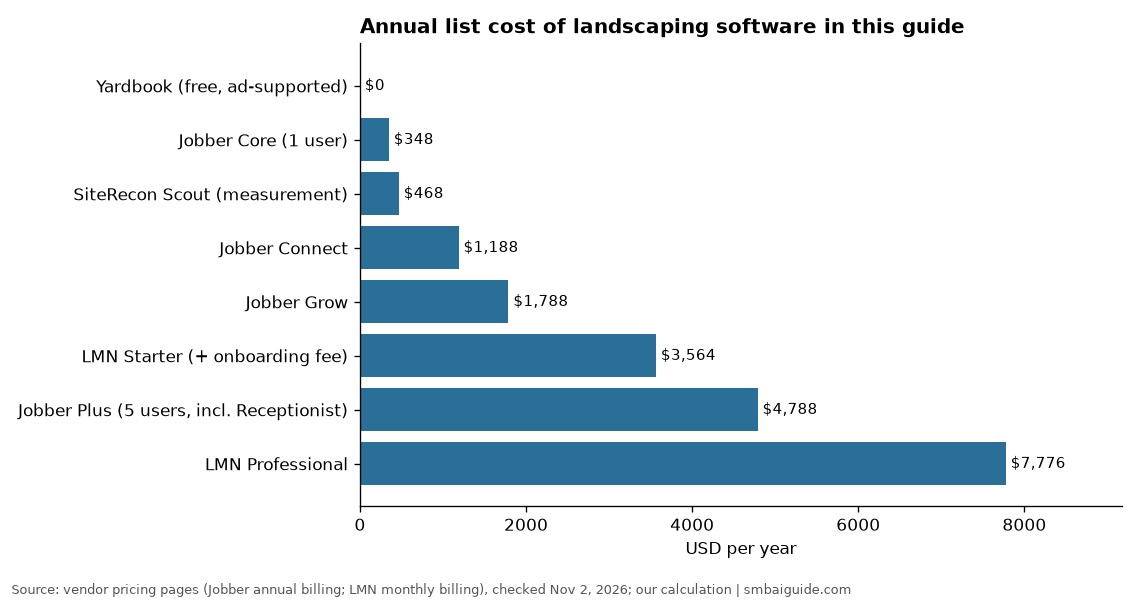
Annual list cost (monthly price × 12; Jobber prices are for annual billing, LMN’s are billed monthly and exclude its one-time onboarding fee):
| Tool | Monthly | Per year | Best fit |
|---|---|---|---|
| Yardbook | Free (ad-supported) | $0 | Solo operators; 1% fee on online payments on free accounts |
| Jobber Core (1 user) | $29 | $348 | Solo or owner-only office |
| SiteRecon Scout | from $39 | from $468 | Includes $20/month in measurement credits |
| Jobber Connect | from $99 | $1,188 | Small crews |
| Jobber Grow | from $149 | $1,788 | Growing crews |
| Jobber Receptionist add-on | $29 (30 conversations) | $348+ | Included on Jobber Plus |
| LMN Starter | from $297 | $3,564 + onboarding | Firms that want detailed job costing |
| Jobber Plus (5 users) | from $399 | $4,788 | Includes Receptionist and crew scheduling |
| LMN Professional | from $648 | $7,776 + onboarding | Larger firms |
When does aerial measurement pay off? (our assumptions) Say each in-person measuring trip costs you 45 minutes of drive and walk time, and you value that time at $40 an hour ($30 per trip). Then:
| Estimates per month you can quote from the office | Time saved | Value at $40/hr | vs. SiteRecon Scout ($39/mo) |
|---|---|---|---|
| 2 | 1.5 hrs | $60 | Pays for itself |
| 5 | 3.75 hrs | $150 | About 4× the cost |
| 15 (spring rush) | 11.25 hrs | $450 | About 11× the cost |
Your own numbers will differ, and the Scout plan’s included credits limit how many properties you can measure before paying more, so check SiteRecon’s credit pricing against your volume. The bigger point is seasonal: BLS notes most grounds work is busiest in spring, summer and fall, so the hours you save land in exactly the weeks you’re shortest on time.
1. Faster, More Accurate Quotes
Measure from aerial imagery
Driving out to measure every lawn and bed before quoting eats your day. AI measurement tools draw property features from aerial imagery so you can quote from the office.
| Tool | What it does (per vendor) | Price |
|---|---|---|
| SiteRecon | AI measurements and property “takeoffs” in minutes; site audit app with GPS-located notes and photos; optional done-for-you estimating | From $39/mo (Scout: 1 user, includes $20/mo in measurement credits); Growth $250/mo adds done-for-you measurements |
| Aspire PropertyIntel (Go iLawn’s site now leads here) | ProMaps AI detects and outlines surfaces such as pavement, natural surfaces and building footprints from high-resolution aerial imagery; AI reads PDF plan legends; automated time and cost estimates | Not published; aimed at midsize and enterprise firms |
| Jobber | Auto-drafted quotes from new requests, or a “Draft for me” button; quote templates; automated quote follow-ups | Plans from $29/month billed annually (see table below) |
Check it before you bid. Imagery can be months old, trees hide beds, and AI outlines can miss a fence line or a new patio. Treat the measurement as a first draft, and spot-check new properties on your first visit.
Let a chatbot write the scope
Once you have measurements and prices, a general AI chatbot (see our ChatGPT vs. Gemini vs. Claude vs. Copilot comparison) can turn your notes into a clean proposal.
Prompt: turn site notes into a proposal
Write a clear, friendly landscaping proposal scope from my notes.
Customer: [first name only]. Services: [weekly mowing April-October,
edging, blowing; spring cleanup; mulch 6 yards in front beds].
My prices: [paste]. Include what's included, what isn't
(e.g., leaf removal), visit frequency, and how weather delays are
handled. Use my prices exactly. Don't add services or prices I
didn't list.
Leave out addresses, phone numbers and payment details. Our guide to AI and customer data privacy explains what’s safe to paste.
2. Routes and Scheduling
Route planning is one of the oldest uses of “smart” software in the trades, and most field service platforms now include it. Not every route optimizer uses generative AI. Many use mapping algorithms. What matters is whether it cuts drive time between stops.
| Software | Price (vendor page, Nov 2026) | Routing and scheduling features |
|---|---|---|
| Jobber | Core $29/month billed annually ($49 month-to-month), 1 user; Connect from $99; Grow from $149; Plus from $399 (5 users) billed annually. Extra users $29/month | Daily or weekly route optimization for the team; “Find a Time” scheduling suggestions based on availability and travel time; GPS tracking; crew scheduling on Plus |
| LMN (by Granum) | Starter from $297/month and Professional from $648/month, billed monthly, after a one-time onboarding fee | Scheduling and crew whiteboard, route optimization, crew time tracking, real-time job costing (Professional) |
| Yardbook | Free (ad-supported); optional premium plans | Job scheduling, routing, timesheets, GPS tracking, chemical tracking. Online payments on free accounts carry a 1% Yardbook fee on top of Stripe’s fees |
Rule of thumb: a solo operator or small crew can start free with Yardbook or on Jobber’s lower tiers. LMN is built for companies that want detailed budgeting and job costing, and its pricing reflects that.
For more on booking tools that let customers schedule themselves, see our guide to AI scheduling assistants.
3. Answer the Phone While You’re on the Mower
Spring is when every homeowner calls at once, and you can’t hear the phone over a zero-turn.
Jobber Receptionist answers calls and texts 24/7. According to Jobber, it can answer questions using your Jobber account details, book visits using your existing online booking settings, create work requests, take messages and text back callers who hang up. You choose keywords that trigger a transfer or text alert to you, and every call is logged with a summary, transcript and recording.
On Jobber’s pricing page (November 2026), Receptionist is a $29/month add-on and is included in the Plus plan. You can forward your existing number after hours or after a set number of rings.
If you don’t use Jobber, our guide to AI receptionists for small business compares standalone options. Our HVAC and plumbing guide covers similar phone workflows for emergency trades.
4. Seasonal Marketing on Autopilot (Almost)
Landscaping marketing follows the calendar, which makes it ideal for batch-writing with AI. Spend one afternoon drafting the whole year, then schedule it.
| When | What to send | Example offer or message |
|---|---|---|
| Late winter | Spring cleanup and mowing sign-ups | “Reserve your spot on our weekly route” |
| Spring | Mulch, bed edging, new plantings | Before-and-after photos from last season |
| Summer | Irrigation checks, watering tips | Local watering-schedule reminders |
| Late summer / fall | Aeration, overseeding, leaf removal | “Fall slots fill fast” |
| Winter | Snow removal contracts, holiday lighting, renewals | Early-renewal reminder for next season |
Prompt: a year of seasonal messages
I run [company], a [lawn care / landscaping] company in [city, state].
Services: [list]. Write a 12-month marketing calendar with one short
email (under 120 words) and one text message (under 160 characters)
per month, timed to our local seasons. Friendly, local tone. No
discounts unless I list them: [list real offers]. No claims about
being "best" or "#1." Mark anything I need to fill in with [CHECK].
A few things to get right:
- Text-message consent. FCC rules say commercial texts require written consent, and informational texts (like “we’re coming Tuesday”) can rely on oral consent. Use your software’s opt-in tools.
- Real photos. Use your actual before-and-after shots on social media and your Google Business Profile. Our one-hour weekly social media system shows how to batch posts.
- Reviews. Ask happy customers for reviews after spring cleanups and big installs, and use our Google review reply prompts to answer them.
Jobber also sells a Marketing Suite add-on ($99/month on its pricing page) that builds a marketing plan and content you approve before anything goes out.
5. Where AI Should Not Make the Call
Pesticides and fertilizer
Never ask a chatbot for application rates, mixing ratios or product recommendations, and never let an AI receptionist answer those questions for customers. EPA explains that pesticide labels are legally enforceable: “It is a violation of Federal law to use this product in a manner inconsistent with its labeling.” In other words, the label is the law.
BLS notes that most states require a license to apply pesticides, and licensing for fertilizer varies by state. Check with your state’s licensing office.
Crew safety and site hazards
AI can help write a safety checklist or translate a tailgate talk, but a person should confirm utility locates, slopes and equipment hazards on site.
Bilingual crews
Jobber lists AI Voice for Field Workers, which lets team members log notes and update jobs hands-free in any language, with instant note translation. Its mobile app is also available in Spanish for team members (not admins or account owners). For crews where Spanish is the first language, that can cut miscommunication on job notes.
Getting Started in 30 Days
- Week 1: Pick your core software (or confirm what you have) and turn on route optimization and automated visit reminders.
- Week 2: Try an aerial measurement tool, or your software’s quote drafting, on five past jobs and compare it with your real measurements.
- Week 3: Turn on an AI receptionist for after-hours calls only, and review every transcript.
- Week 4: Draft your 12-month marketing calendar with the prompt above.
Write down simple rules for your team, such as what can go into a chatbot and who approves customer messages. Our AI policy template gives you a starting point, and our 30-day getting-started plan covers the basics. Doing hardscapes or remodels too? See AI for contractors.
Next steps
- List your current software and what you pay per year, using the table above as a checklist.
- Turn on route optimization and automated visit reminders in whatever field-service tool you already use.
- Test an aerial measurement tool on five past jobs where you know the real measurements, and note how far off it was.
- Set up an AI receptionist for after-hours calls only before spring, and read every transcript for the first month.
- Draft a 12-month seasonal marketing calendar with the prompt in Part 4, and send marketing texts only to customers who opted in.
- Write down the rule that no AI output decides chemical rates or safety; the label and your state license rules do.
FAQ
What is the best AI tool for a landscaping business?
There isn’t one tool for everything. Field service software such as Jobber combines AI quote drafting, routing and an AI receptionist. Aerial measurement tools such as SiteRecon and PropertyIntel speed up takeoffs. A general chatbot handles proposals and marketing copy.
Can AI measure a lawn for a quote?
Yes. Tools like SiteRecon and Aspire’s PropertyIntel use AI on aerial imagery to measure properties. Imagery can be outdated or blocked by trees, so verify measurements before you commit to a price on a new property.
Is there free landscaping software with routing?
Yardbook is free and ad-supported, with scheduling, routing and invoicing. It charges a 1% fee on online payments for non-premium accounts, on top of Stripe’s processing fees.
How much does Jobber’s AI Receptionist cost?
On Jobber’s pricing page in November 2026, Receptionist is a $29/month add-on, and it’s included in the Plus plan. Jobber offers a 14-day free trial of the Grow plan.
Can AI tell me how much fertilizer or herbicide to apply?
Don’t rely on it. Follow the product label, which is legally enforceable under federal law, and your state’s licensing rules. AI tools can get rates wrong, and the liability is yours.
How much does landscaping software with AI cost per year?
At November 2026 list prices: Yardbook is free (ad-supported); Jobber runs from $348 a year (Core, billed annually) to $4,788 (Plus, 5 users, includes Receptionist); LMN starts around $3,564 a year plus an onboarding fee; SiteRecon’s measurement plan starts at $468 a year.
Sources and methodology
How we gathered this. Tool features and prices come from vendor pricing and product pages (Jobber, LMN by Granum, Yardbook, SiteRecon, Aspire), checked November 2, 2026; Jobber’s Receptionist pricing was rechecked November 17, 2026. Labor and seasonality figures come from the BLS Occupational Outlook Handbook; pesticide label guidance from the U.S. EPA. Annual costs are our arithmetic (monthly price × 12). The measurement payback table uses labeled assumptions (45 minutes per measuring trip, $40/hour) and is illustrative, not measured. We have not tested these tools hands-on. No affiliate links.
Sources
- U.S. Bureau of Labor Statistics, Occupational Outlook Handbook, “Grounds Maintenance Workers”: https://www.bls.gov/ooh/building-and-grounds-cleaning/grounds-maintenance-workers.htm
- Jobber, Pricing: https://www.getjobber.com/pricing/
- Jobber, Receptionist: https://www.getjobber.com/features/ai-receptionist/
- LMN by Granum, Plans & Pricing: https://granum.com/lmn/pricing/
- Yardbook (features and terms): https://www.yardbook.com/
- SiteRecon, Pricing: https://order.siterecon.ai/pricing
- Aspire, PropertyIntel (formerly Go iLawn): https://www.youraspire.com/products/propertyintel
- U.S. EPA, “Introduction to Pesticide Labels”: https://www.epa.gov/pesticide-labels/introduction-pesticide-labels
- FCC, “Stop Unwanted Robocalls and Texts”: https://www.fcc.gov/consumers/guides/stop-unwanted-robocalls-and-texts