How to Write a Win-Back Email With AI (Plus Newsletters and Seasonal Campaigns)
Last updated: November 17, 2026
If you want to know how to write a win-back email with AI, the short version is: give the AI the real facts (what the customer usually buys, how long it’s been, whether you have an offer), ask for two short emails, and edit before you send. This guide gives you that prompt, plus prompts for a monthly newsletter and a year of seasonal emails, what the main email platforms cost at different list sizes (checked November 17, 2026), and the US rules every marketing email has to follow.
Your email list is one of the few marketing channels you actually own. No algorithm decides whether your customers see your message. The hard part has always been the writing, and that is exactly the part AI is good at.
Key Takeaways
- Use AI to draft emails and subject lines, then add real details (names, dates, offers) yourself. Tell it in every prompt not to invent offers or prices.
- A simple two-email win-back sequence (a friendly reminder, then a last nudge two weeks later) is enough for most small businesses.
- At 1,000 subscribers, MailerLite’s Comfort plan lists at $19/month ($228/year); Constant Contact starts at $12/month and Mailchimp Standard at $20/month for 500 contacts. Cost climbs with list size, so clean your list.
- Using our break-even tool below, a $19/month plan pays for itself with about one extra booking every two months for a business making $40 gross margin per visit.
- Every commercial email must follow CAN-SPAM: honest headers and subject lines, your postal address, a working unsubscribe link, and opt-outs honored within 10 business days.
Not the guide you need? This one is about writing marketing emails that bring customers back. If you want AI to help you sort, summarize and reply to your everyday inbox, read AI for Email: How Small Business Owners Can Tame the Inbox in 20 Minutes a Day.
Where AI Actually Helps in Email Marketing
AI is good at the parts of email that take the most time and the least judgment:
- Blank-page drafts. Turning “we’re closed for Thanksgiving, book early” into a friendly, readable email.
- Subject lines. Generating ten options so you can pick the clearest.
- Repurposing. Turning a social post, blog article or customer FAQ into a newsletter section.
- Rewrites. Making a long email shorter, warmer or more direct.
AI is not good at knowing your prices, your schedule, your offers or your customers. Like any chatbot, it will happily invent a “15% off” deal if you don’t stop it. Every prompt below includes a line telling it not to.
How to Write a Win-Back Email With AI (Step by Step)
Win-back emails go to customers who haven’t bought or booked in a while. Most email platforms let you build a segment by last purchase or last activity (features vary by plan), and many booking tools can segment by last visit.
Step 1: Define “lapsed” for your business. Use your normal repeat cycle, not a generic number. A haircut customer who hasn’t been back in 8 weeks is lapsed; an HVAC tune-up customer isn’t lapsed until about 12 months.
Step 2: Decide whether you have an offer. A win-back email does not need a discount. If you do offer one, decide the real terms and end date before you open the AI tool.
Step 3: Use this two-email structure.
| When | Goal | |
|---|---|---|
| 1. “We miss you” | After your normal repeat cycle has passed | Friendly reminder plus an easy booking link |
| 2. Last nudge | 2 weeks later, if no response | Give a reason to come back (a real offer, if you choose to make one) |
Step 4: Paste this prompt.
Write a two-email win-back sequence for customers of [business]
who haven't [booked/bought] in [time period].
Email 1: warm, short, no discount, mention [what they usually
buy] and include a booking link placeholder.
Email 2 (two weeks later): [offer, if any, e.g., "free add-on
with your next visit" OR "no offer, just a reminder"].
Each under 120 words, with 3 subject line options.
No guilt-tripping, fake urgency or invented deadlines.
Don't invent prices, offers or statistics. Write [CHECK] where
you need information I didn't give you.
Step 5: Edit, then test. Replace every [CHECK], read it out loud, and send a test to yourself on your phone. Make sure the unsubscribe link and your postal address appear at the bottom.
Keep the tone light. Some people simply moved or changed routines, and an easy unsubscribe is better than a spam complaint.
The Monthly Newsletter Prompt
A monthly newsletter keeps you in mind between visits. Three short sections and one clear call to action is enough.
Write a short monthly email newsletter for [business name], a
[type of business] in [city]. Audience: [past customers].
Voice: friendly, plain English, no hype.
Include three short sections:
1. What's new: [real update]
2. Tip of the month: [topic your customers ask about]
3. Reminder: [upcoming event, hours change or seasonal service]
End with one call to action: [book / call / reply].
Under 250 words. Give me 5 subject line options under 50
characters. Don't invent offers, prices, statistics or reviews.
Write [CHECK] where you need information I didn't give you.
Make it yours: add one real photo, one specific detail (a staff member’s name, a local event) and a sign-off from you. That is what separates your email from every other AI-generated newsletter in the inbox.
The 12-Month Seasonal Calendar Prompt
Seasonal emails are where AI saves the most time, because you can draft a whole year in one sitting.
I run [business] in [city, state]. Services/products: [list].
Create a 12-month email calendar timed to our local seasons,
holidays and busy periods. For each month give: the campaign
theme, a send date, 3 subject lines, and a 100-word draft.
Only use these real offers: [list, or "none"].
Flag anything that depends on dates I need to confirm.
Review it against your actual calendar. Remove holidays that don’t fit your customers and add local events the AI doesn’t know about. The same seasonal message can go to social media with our one-month social media planning system and to your Google Business Profile as a post. For the bigger picture on local search, see AI for local SEO.
What Email Marketing Tools Cost in 2026 (Our Comparison)
We compiled the table below from each vendor’s own pricing page on November 17, 2026. All three include AI writing help on at least some plans.
| Platform | Free option | Entry paid price (monthly billing) | AI writing features | Send limit |
|---|---|---|---|---|
| Mailchimp | Up to 250 contacts; max 500 sends/month (250/day) | Standard “starting at $20/month” (500 contacts) | Generative AI features on Standard and Premium at no extra cost; not on Free or Essentials | Standard: 12x contacts per month |
| Constant Contact | Free trial, no card | Lite from $12, Standard from $35, Premium from $80/month; prepaying 12 months saves up to 15% | AI copy generator on all plans; AI campaign builder from Standard | 10x (Lite), 12x (Standard), 24x (Premium) contacts |
| MailerLite | Up to 250 subscribers, 2,500 emails/month | Comfort from $12, Power from $25/month; annual billing saves 10% | AI writing assistant on paid plans | Comfort: 10x the top of your tier; Power: unlimited (fair use) |
Prices are list prices before tax and can change; MailerLite was also running a temporary annual-plan coupon when we checked, which we ignored. Mailchimp counts unsubscribed contacts toward your plan size, so cleaning your list can lower your bill.
How cost grows with your list
Because MailerLite publishes every tier on its pricing page, we used it to show how list size drives cost. The per-subscriber math is ours.
| Subscribers | Comfort per month | Comfort per year (monthly billing) | Cost per subscriber per year | Power per month |
|---|---|---|---|---|
| Up to 500 | $12 | $144 | $0.29 | $25 |
| Up to 1,000 | $19 | $228 | $0.23 | $39 |
| Up to 2,500 | $33 | $396 | $0.16 | $49 |
| Up to 5,000 | $49 | $588 | $0.12 | $69 |
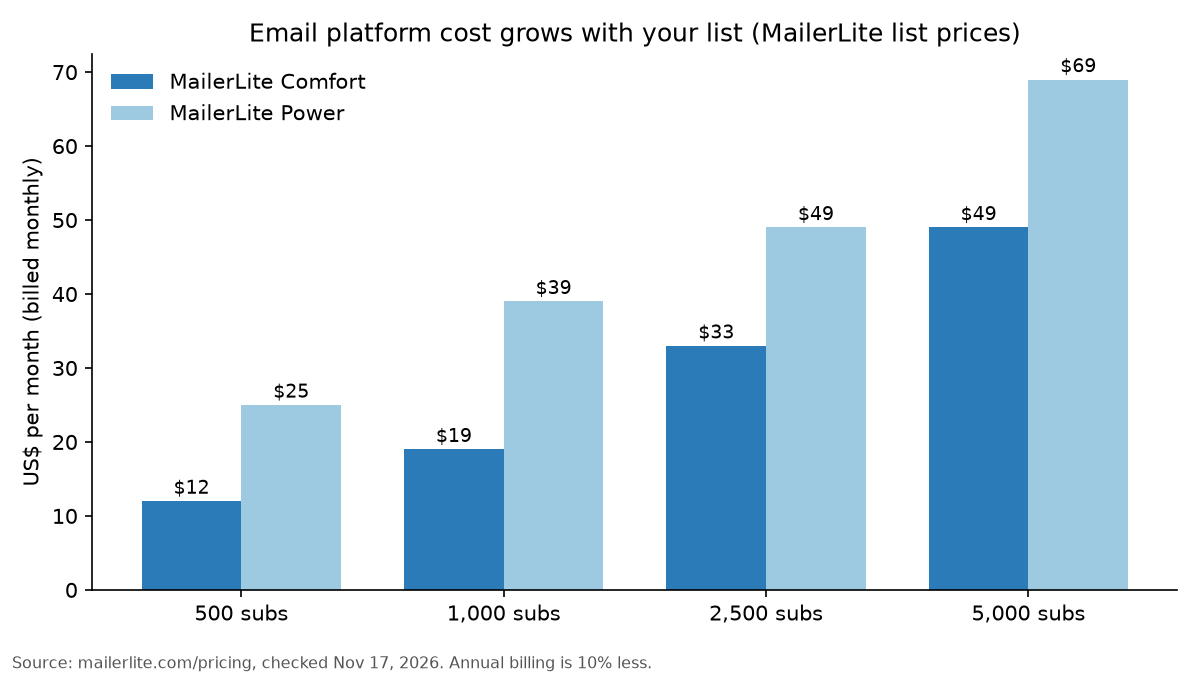 Monthly list prices by subscriber tier. Source: MailerLite pricing page, checked November 17, 2026.
What this tells you: going from 500 to 5,000 subscribers multiplies the list size by 10 but the Comfort bill by about 4. The total bill still rises every tier, so the practical move for a small business is to remove people who haven’t opened anything in a year (after one last re-permission email) instead of paying to keep them.
Which to choose:
- Under 250 contacts and just starting? Mailchimp’s and MailerLite’s free plans are enough to learn on. MailerLite’s free plan allows more monthly sends (2,500 vs. 500).
- Want AI writing at the lowest entry price? Constant Contact Lite and MailerLite Comfort both start at $12/month.
- Already use booking or field service software? Check whether it sends marketing email before paying for another tool (see our guides for salons and landscapers).
You can also draft in a general chatbot and paste into any platform. See our comparison of ChatGPT, Gemini, Claude and Copilot.
Tool: Will Email Marketing Pay for Itself?
Use this worked calculator with your own numbers. The example values are assumptions, not data from any real business.
A. Monthly platform cost:                 $19   (MailerLite Comfort, 1,000 subs)
B. Average sale or visit value:           $80   (assumption: replace with yours)
C. Gross margin on that sale:             50%   (assumption: replace with yours)
D. Profit per extra sale (B x C):         $40
E. Extra sales needed per month (A / D):  0.475
In this example, you need about one extra booking every two months to cover the platform. If a win-back sequence to lapsed customers brings back even one person a month, it covers the tool more than twice over. If your margin is $10 a sale instead of $40, you’d need about two extra sales a month, which is still a realistic bar. Track it with the measures below rather than guessing.
The Rules: CAN-SPAM and Inbox Requirements
CAN-SPAM basics (US federal law)
The CAN-SPAM Act (15 U.S.C. § 7704) applies to commercial email, whoever or whatever wrote it:
- No false or misleading header information (From, To, routing).
- No deceptive subject lines. Watch AI suggestions like “Re: your appointment” on a promotional email.
- Identify the message as an ad (unless the recipient gave prior affirmative consent).
- Include a valid physical postal address.
- Provide a clear way to opt out, and stop sending within 10 business days of an opt-out request.
Violations are treated as violations of an FTC rule, and the current inflation-adjusted civil penalty for those is up to $53,088 per violation (16 CFR § 1.98(d)). Each non-compliant email can count separately. That’s not a reason to panic; your email platform builds in the unsubscribe link and address footer. It’s a reason not to remove them or buy lists.
Gmail’s sender requirements
Google’s Email sender guidelines require all senders to Gmail accounts to set up SPF or DKIM authentication and keep spam rates reported in Postmaster Tools below 0.3% (Google recommends staying under 0.1%). Senders of more than 5,000 messages a day to Gmail must also set up DMARC and support one-click unsubscribe. Your platform handles most of this, but you may need to add DNS records for your domain.
Google’s guidelines also say: don’t buy email addresses, don’t send to people who didn’t sign up, and avoid pre-checked opt-in boxes.
Protect customer data
Don’t paste your customer list, purchase histories or personal details into a public chatbot. Use the AI features inside your email platform, or anonymize what you paste. Our guide to AI and customer data privacy explains how. If staff send email for you, put the rules in writing with our AI policy template.
Texting customers too? Text messages follow different rules. The FCC says autodialed texts to a mobile phone need the owner’s prior consent, commercial texts require written consent, and people can opt out at any time in any reasonable manner.
How to Measure Results
Don’t judge your emails on open rates alone. Google’s sender guidelines say it doesn’t track open rates and that low open rates “aren’t necessarily an accurate indicator” of deliverability problems.
Better measures for a small business:
- Clicks on your booking or shop link
- Replies and phone calls after a send
- Bookings or sales in the 7 days after a campaign (plug these into the calculator above)
- Unsubscribes and spam complaints (if they spike, send less or make emails more relevant)
Once a quarter, ask your AI tool to compare your three best and three worst emails (paste the text only, no customer data) and suggest why. Then test one change at a time.
Next Steps
- Pick a platform using the cost table above. If you have under 250 contacts, start on a free plan.
- Check your footer: confirm your postal address and unsubscribe link appear on a test email.
- Build one segment of customers past their normal repeat cycle.
- Run the win-back prompt, edit every [CHECK], and schedule both emails.
- Fill in the break-even calculator with your real numbers after 30 days and decide whether to keep going.
- Draft your 12-month seasonal calendar in one sitting and put the send dates on your calendar.
FAQ
How do I write a win-back email with AI?
Tell the AI what the customer usually buys, how long it’s been, and whether you have a real offer. Ask for two short emails (a friendly reminder and a last nudge two weeks later) with no invented deals or fake urgency. Then edit in real details and send a test to yourself first.
What is the best AI email marketing tool for a small business?
It depends on list size and budget. Mailchimp and MailerLite both have free plans up to 250 contacts or subscribers. Constant Contact includes an AI copy generator on every plan from $12/month. Mailchimp’s generative AI is on Standard (from $20/month) and Premium, as of November 17, 2026.
Is it legal to send AI-written marketing emails?
Yes, as long as the email follows the CAN-SPAM Act: no misleading headers or subject lines, identification as an ad, your physical address, a working opt-out, and opt-outs honored within 10 business days. Who or what wrote it doesn’t change the rules.
Can AI write my email subject lines?
Yes. It’s one of the best uses. Ask for several options, pick the clearest, and avoid misleading tricks like fake “Re:” or “Fwd:” prefixes, which Google’s sender guidelines specifically warn against.
How often should a small business send marketing emails?
There’s no universal rule. A monthly newsletter plus a few seasonal or win-back emails is a manageable start. Watch unsubscribes and spam complaints, and keep Gmail’s reported spam rate below 0.1% (Google says it should never reach 0.3%).
Can I upload my customer list to ChatGPT to personalize emails?
It’s not a good idea. Customer lists contain personal information. Use your email platform’s built-in personalization and AI features, or anonymize data before using a general chatbot.
Sources and Methodology
How we gathered the data: On November 17, 2026, we read each vendor’s public US pricing page and recorded list prices on monthly billing, ignoring time-limited coupons. MailerLite’s per-tier prices come from the tier data published on its pricing page; the annual totals and cost-per-subscriber figures are our own arithmetic (monthly price x 12, divided by the top of the tier). Mailchimp and Constant Contact price by contact count; we report only the starting prices they publish. The break-even calculator uses stated example assumptions, not data from a real business. Legal points come from the statute, the eCFR and Google’s own sender guidelines. Prices change often; we recheck this article every 90 days.
- Mailchimp, Marketing pricing: https://mailchimp.com/pricing/marketing/
- Mailchimp, Compare plans: https://mailchimp.com/pricing/marketing/compare-plans/
- Mailchimp, Standard plan: https://mailchimp.com/landers/pricing/standard/
- Mailchimp Help, “About Mailchimp Pricing Plans”: https://mailchimp.com/help/about-mailchimp-pricing-plans/
- Constant Contact, Pricing: https://www.constantcontact.com/pricing
- MailerLite, Pricing: https://www.mailerlite.com/pricing
- 15 U.S. Code § 7704 (CAN-SPAM Act), via Cornell LII: https://www.law.cornell.edu/uscode/text/15/7704
- 16 CFR § 1.98, Adjustment of civil monetary penalty amounts (eCFR): https://www.ecfr.gov/current/title-16/chapter-I/subchapter-A/part-1/subpart-L/section-1.98
- Google, Email sender guidelines: https://support.google.com/a/answer/81126?hl=en
- FCC, “Stop Unwanted Robocalls and Texts”: https://www.fcc.gov/consumers/guides/stop-unwanted-robocalls-and-texts