How to Use AI to Follow Up With Leads and Old Quotes
Last updated: November 17, 2026
If you’re wondering how to use AI to follow up with leads, start with the pile you already have. Somewhere in your inbox, estimating software or a spreadsheet are quotes that never got a yes or a no. Each one is a customer who was interested enough to ask for a price.
Following up is the part most owners skip. It’s awkward, it takes time, and there’s always a job to finish first. AI can’t make the call for you, but it can write the messages, sort the list and send reminders on schedule. This guide shows how, with prompts, a calculator to see what your open quotes are worth, tool costs (checked November 17, 2026) and the US rules for texts and emails.
Key Takeaways
- Sort first, then draft. Group open quotes by age, then use AI to write short, specific follow-ups: a check-in, an answer to the likely concern, and a polite close-out.
- Small businesses say reaching customers and growing sales is their #1 operational challenge, and 31% of firms using AI report higher sales (Federal Reserve Banks, 2025 survey).
- Our calculator shows that with 20 open quotes averaging $1,500, winning back just 2 of them at a 30% margin earns about $900 in gross profit, enough to cover even a mid-priced tool for most of a year. Use your own numbers.
- Tools: a spreadsheet plus a free chatbot costs $0; HubSpot Starter lists at $20 per seat per month; Jobber’s quote follow-ups start on Connect ($99/month billed annually, 1 user).
- Rules: commercial texts need written consent under FCC rules, AI-voice calls need prior consent, and marketing emails must meet CAN-SPAM.
Step 1: Build Your Follow-Up List
Before AI can help, you need a list. Export or copy your open quotes and leads into a spreadsheet with:
- Name and contact method (and whether they agreed to texts)
- What they asked for, and the quote amount
- Date of the quote or last contact
- Any notes: objections, timing, who else they were comparing
Then sort them into groups:
| Group | Age | Goal |
|---|---|---|
| Fresh quotes | Under 2 weeks | Answer questions, make it easy to say yes |
| Stalled quotes | 2 weeks to 3 months | Find out what’s holding them up |
| Old quotes and leads | 3+ months | Re-open the conversation, often with a seasonal reason |
| Lost (with a reason) | Any | Learn why; revisit only if something has changed |
AI can help with the sorting too. Paste the list (with personal details removed if you prefer) and ask it to group rows by age and flag any with notes like “price” or “timing.”
Tool: What Are Your Open Quotes Worth?
Fill this in with your own numbers. The example figures are assumptions to show the math, not results from a real business.
A. Open quotes with no answer:                  20
B. Average quote value:                         $1,500   (assumption)
C. Value sitting in open quotes (A x B):        $30,000
D. Extra quotes you win from follow-up:         2        (assumption: 10% of A)
E. Extra revenue (D x B):                       $3,000
F. Your gross margin:                           30%      (assumption)
G. Extra gross profit (E x F):                  $900
H. Yearly tool cost (from the table below):     $0 to $1,188 for 1 user
At these assumptions, recovering two jobs pays for a spreadsheet-and-chatbot setup many times over and covers most of a year of a paid field service plan. If you win only one, you’re still at $450 in gross profit. Track your real win rate for two months before paying for anything.
Step 2: How to Use AI to Follow Up With Leads: The Message Prompts
Good follow-ups are short, specific and useful. They remind the customer what they asked for, add something helpful, and make the next step easy. AI is good at producing variations quickly. Your job is to add the real details.
Prompt: three-message quote follow-up sequence
Write a 3-message follow-up sequence for a [trade/business] quote.
Customer: [first name]. Job: [what they asked for]. Quote: [amount].
Sent: [date]. Notes: [anything they said].

Message 1 (3 days after): friendly check-in, offer to answer
questions, one-line reminder of what's included.
Message 2 (10 days after): address the most likely concern
[price/timing/scope] with a genuine, helpful point.
Message 3 (21 days after): polite close-out. Ask if they'd like us
to keep the quote open or close it. No pressure.

Each message under 80 words, plain language, signed [your name].
Don't invent discounts, deadlines or scarcity. Write an email version
and a text version of each.
The “polite close-out” message often gets replies, because it gives people an easy way to say no, or a reason to say “actually, let’s do it.”
Prompt: reviving old leads with a seasonal reason
Write a short, friendly message to past leads who asked about
[service] [3-12] months ago but didn't book. Give a real reason to
reach out now: [season, schedule opening, new service, price
change]. Mention their original request briefly. Include a simple
next step (reply YES for an updated quote). Under 70 words.
No fake urgency.
Seasonal timing works well for trades. Our guides for landscaping, HVAC and plumbing and contractors include seasonal ideas.
Prompt: answering the price objection honestly
A customer said our quote of [amount] for [job] is higher than
another quote. Write a respectful reply that explains what's
included [list], what may differ in cheaper quotes [materials,
warranty, licensing, cleanup — only if true for us], and offers
options [smaller scope, phased work, financing if we offer it].
Don't criticize competitors. Under 120 words.
Make it personal
AI drafts can sound generic. Before sending, add one real detail per message: their dog, their deadline, the problem they mentioned. That detail is what makes it read like you wrote it.
Step 3: Automate the Reminders (Tool Costs Compared)
You don’t need to send every message by hand. We compiled current list prices from each vendor’s page on November 17, 2026 and worked out yearly costs.
| Tool | What it does for follow-up | Monthly price (vendor page) | Yearly, 1 user | Yearly, 5 users |
|---|---|---|---|---|
| Spreadsheet + chatbot | Track dates in a sheet; draft messages with ChatGPT, Gemini, Claude or Copilot | Free tiers available | $0 | $0 |
| HubSpot free CRM | Contact management, deal pipelines, Breeze AI assistant | $0 | $0 | $0 |
| HubSpot Starter | Adds more sales tools on top of free CRM | “Normally priced at $20/month per seat” (new-customer discounts were running) | $240 | $1,200 |
| Jobber Connect | Automatic email or text quote follow-ups (up to two reminders, up to 90 days after the quote); Jobber AI can draft quotes from requests | 1 user: $139 no commitment, $119 with 1-year commitment, $99 billed annually; 5 users: $149 billed annually | $1,188 | $1,788 |
| Jobber Pipeline add-on | Tracks every request and quote in one view | $49/month add-on | $588 extra | $588 extra |
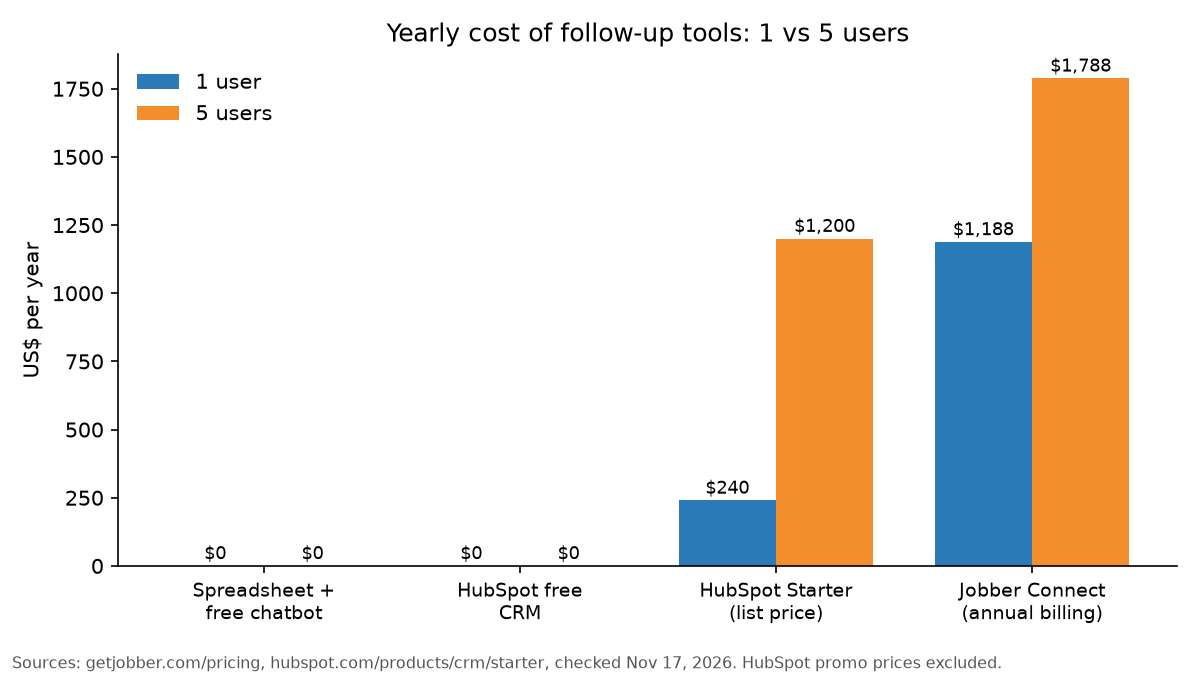 Yearly cost by option. Sources: Jobber and HubSpot pricing pages, checked November 17, 2026. HubSpot’s limited-time discounts are excluded.
What the numbers show: for a solo owner, the jump from free to Jobber Connect is about $1,188 a year, so it’s worth it mainly if you also need its scheduling, invoicing and payments. Jobber’s 5-user tier gets cheaper per person as you grow ($1,788 / 5 = about $358 per user per year), while HubSpot Starter stays at $240 per seat. Jobber’s cheapest Core plan ($29/month billed annually) doesn’t include quote follow-ups.
If you already use a field service or booking platform, check its automation settings before buying anything new. Many include quote or invoice reminders. For overdue invoices specifically, see our guide to AI invoicing.
Fast responses matter for new leads too. An AI receptionist can capture after-hours calls so they don’t go cold in the first place. If your sales calls involve AI note-takers, our guide to AI meeting notes covers recording consent.
Step 4: Follow the Rules
Follow-ups go to real people with legal protections. This is general information, not legal advice.
Texts
The FCC says “commercial texts require written consent” for texts sent using an autodialer. Only automate texts to people who have agreed to receive them, and honor opt-out requests. The FCC says consumers “may opt out of any robocall or robotext at any time and in any reasonable manner.”
Calls and AI voices
The FCC states that “AI-generated voice calls are illegal unless the consumer has agreed to receive them or the caller is exempt.” Don’t use AI voice-calling tools to chase leads without proper consent. Telemarketing calls are also subject to the National Do Not Call Registry.
Emails
Commercial emails fall under the CAN-SPAM Act (15 U.S.C. § 7704). Its requirements include no deceptive subject lines, a working opt-out mechanism, honoring opt-outs, and a valid physical postal address. Our AI email marketing guide covers these in more detail.
Data
If you paste customer lists into an AI tool, check how that tool handles your data. See our AI data privacy guide.
Step 5: Track What Works
Keep it simple. In your spreadsheet or CRM, track for each message:
- Replies (including “no thanks,” which is still useful)
- Quotes accepted after follow-up
- Revenue booked from revived quotes
- Opt-outs, as a sign you’re contacting too often
After a month or two, ask AI to compare which message versions got more replies, then refine. Your own results matter more than any general benchmark.
Next Steps
- Export your open quotes from the last six months into a spreadsheet with dates and consent status.
- Sort them into the four groups in Step 1.
- Fill in the calculator to see what the pile is worth.
- Run the three-message prompt for your fresh and stalled quotes, adding one personal detail to each message.
- Send the close-out message to quotes older than three months.
- Decide on a tool after two months of tracking replies and wins, using the cost table above.
FAQ
How do I use AI to follow up with leads?
Put your open quotes and leads in a list with dates, notes and consent status. Ask a chatbot to draft a short three-message sequence for each group (a check-in, an answer to the likely concern, a polite close-out), add one real detail per message, and send by email, or by text only to people who agreed to texts.
How many times should I follow up on a quote?
There’s no universal number. A short sequence of two or three helpful messages over a few weeks, ending with a polite close-out, respects the customer and keeps the door open. Stop immediately if someone asks you to.
Can AI send follow-ups automatically?
Yes. Tools like Jobber (Connect plan and up) can send up to two scheduled quote reminders, and CRMs can automate sequences. Review the templates carefully, personalize where you can, and only automate texts to people who have consented.
Is it legal to text old leads?
It depends on consent. FCC rules require written consent for commercial texts sent with an autodialer, and people can opt out at any time. If you don’t have consent to text a lead, use email (following CAN-SPAM) or a personal phone call instead.
Should I offer a discount to revive old quotes?
Only if it’s real and sustainable for your business. Offering options such as a smaller scope, phased work or a better schedule slot often works without cutting your price. Don’t invent deadlines or fake scarcity.
What’s the best AI tool for sales follow-up?
The one you’ll actually use. If you already run your business on a field service platform or CRM, start with its built-in follow-ups. Otherwise, a spreadsheet plus a chatbot for drafting is a free way to start.
Sources and Methodology
How we gathered the data: Tool features and list prices come from Jobber’s pricing page and help center and HubSpot’s Starter pricing page, read November 17, 2026. Yearly costs are our arithmetic (monthly price billed annually x 12, or per-seat price x seats); we excluded limited-time promotions. Small business challenge and AI outcome figures come from the Federal Reserve Banks’ 2026 Report on Employer Firms (a convenience sample of 6,525 firms). The quote calculator uses stated example assumptions, not data from a real business. Legal points come from the FCC’s consumer guide and the CAN-SPAM statute. This is general information, not legal advice.
- Jobber Help Center, “Automations”: https://help.getjobber.com/hc/en-us/articles/24244124296471-Automations
- Jobber pricing: https://www.getjobber.com/pricing/
- HubSpot Smart CRM: https://www.hubspot.com/products/crm
- HubSpot, Starter Customer Platform pricing: https://www.hubspot.com/products/crm/starter
- FCC, “Stop Unwanted Robocalls and Texts”: https://www.fcc.gov/consumers/guides/stop-unwanted-robocalls-and-texts
- 15 U.S. Code § 7704 (CAN-SPAM), via Cornell LII: https://www.law.cornell.edu/uscode/text/15/7704
- Federal Reserve Banks, 2026 Report on Employer Firms (2025 Small Business Credit Survey): https://www.fedsmallbusiness.org/reports/survey/2026/2026-report-on-employer-firms