AI for Small Business: A 30-Day Getting-Started Plan for Non-Tech Owners
Last updated: November 17, 2026
You don’t need to understand how AI works to get value from it, just like you don’t need to understand engines to drive a truck. You do need a plan. Otherwise it’s easy to sign up for five tools, play with them for a weekend, and drift back to the old way of doing things.
This is a 30-day AI plan for small business owners who are busy, skeptical, or both. It takes about 20–30 minutes a day, starts free, and ends with a clear answer: is AI saving you enough time to pay for?
Key Takeaways
- Week 1: pick one AI assistant (free, or one you already pay for), set privacy rules, and time your 10 most repetitive tasks.
- Week 2: get three low-risk quick wins: customer emails, review replies, and marketing or job-post copy.
- Week 3: try one bigger workflow for your trade, such as estimates, scheduling, bookkeeping or call handling.
- Week 4: re-time the same tasks, including checking time, and decide whether to pay.
- The bar is low: by our math, a $20/month plan pays for itself if it saves about 7 minutes a week at a $40/hour value. Checking time, not the price, decides whether it’s worth it.
Why start now, and why start small
You’re not late. The U.S. Census Bureau’s Business Trends and Outlook Survey found roughly 17% to 20% of U.S. businesses reported using AI in a business function between December 2025 and May 2026, and use among firms with fewer than 20 employees didn’t change significantly over that period (Census Bureau).
The U.S. Small Business Administration’s guidance boils down to: start small, try free or low-cost tools to see whether they add value, have a person review what the tools produce, and avoid feeding them sensitive or proprietary information (SBA). (SBA’s page now uses the term “SI” rather than “AI.”) This plan follows that advice.
Week 1 (Days 1–7): Set up and set rules
Day 1: Pick one tool
Use one general AI assistant for the whole 30 days. Switching tools mid-test makes it impossible to compare.
- Already on Google Workspace or Microsoft 365? Start with the Gemini or Copilot Chat you may already have.
- Otherwise: start with the free version of ChatGPT, Claude or Gemini.
Our ChatGPT vs Gemini vs Claude vs Copilot comparison explains the differences and current prices.
Day 2: Set privacy settings
On free and personal plans, some tools can use your chats to improve their models unless you turn that off. Take five minutes to check settings, and adopt one rule: no Social Security numbers, card or bank numbers, passwords or health information in a chatbot. Ever. Our AI and customer data privacy guide walks through each tool’s settings.
Day 3: Write a one-page AI rule sheet
If anyone else in your business will use AI, write down which tool is approved, what never gets pasted, and that a person checks everything before it goes to a customer. Our AI policy template for employees gives you a ready-made version.
Days 4–7: Build your “before” list
This is the step most people skip, and it’s the only way to know if AI is worth paying for. Write down your 10 most repetitive writing or admin tasks and roughly how long each takes per week.
| Task | Times per week | Minutes each | Weekly minutes |
|---|---|---|---|
| Replying to quote requests | 15 | 6 | 90 |
| Responding to reviews | 5 | 5 | 25 |
| Writing social posts | 3 | 20 | 60 |
| … |
The break-even math: how many minutes does AI need to save?
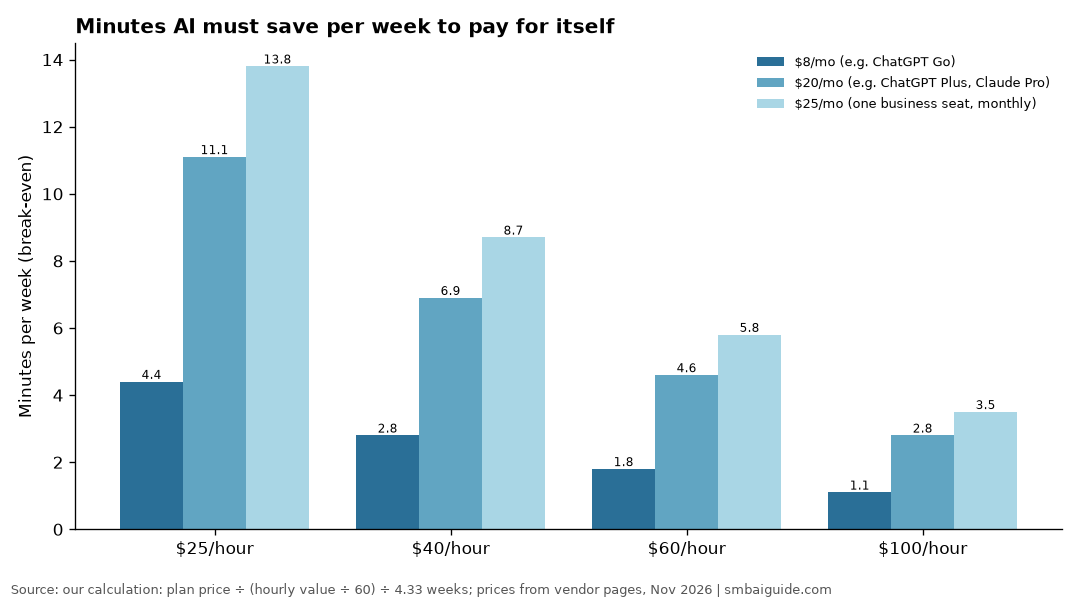
Before you spend a dollar, it helps to know how low the bar is. We worked out the break-even point for three common price levels: the minutes per week a tool has to save, after you’ve checked its work, to cover its monthly price. The formula is simple: monthly price ÷ (your hourly value ÷ 60) ÷ 4.33 weeks per month.
| Plan price | At $25/hour | At $40/hour | At $60/hour | At $100/hour |
|---|---|---|---|---|
| $8/mo (e.g. ChatGPT Go) | 4.4 min | 2.8 min | 1.8 min | 1.1 min |
| $20/mo (e.g. ChatGPT Plus, Claude Pro) | 11.1 min | 6.9 min | 4.6 min | 2.8 min |
| $25/mo (one business seat, monthly) | 13.8 min | 8.7 min | 5.8 min | 3.5 min |
What this tells you:
- The subscription is rarely the real cost. At $40 an hour, a $20 plan pays for itself if it saves about 7 minutes a week. Almost any task on your “before” list clears that.
- Your checking time is the real cost. If a reply takes 6 minutes to write yourself and 4 minutes to prompt, read and fix, you saved 2 minutes, not 6. That’s why Week 4 re-times tasks including review.
- Per-person pricing adds up. A business seat is per user. Five people on monthly billing at $25 each is $125 a month, so the test in Week 4 should be done per person, not for the business as a whole.
Fill-in worksheet (copy into a spreadsheet):
A. Weekly minutes on your top 10 tasks BEFORE AI:        ______
B. Weekly minutes on the same tasks AFTER AI (incl. review): ______
C. Minutes saved per week (A - B):                        ______
D. Your hourly value ($):                                 ______
E. Monthly value of time saved = C x 4.33 x D / 60:       $______
F. Monthly cost of the plan (x number of users):          $______
Keep paying only if E is clearly bigger than F.
Week 2 (Days 8–14): Three quick wins
Pick tasks where a mistake is easy to catch and low-stakes.
Quick win 1: Customer emails
I run a [business type] in [city]. Draft a reply to this customer email
[paste, with names and contact details removed]. Tone: friendly and
direct. Include [key details]. Under 120 words. Don't promise anything
I haven't listed.
Quick win 2: Review replies
Write a reply to this [star rating] Google review: [paste review]. Thank
them by first name, mention one specific detail from their review, and
keep it under 80 words. If negative, apologize without admitting fault
and invite them to call [phone].
For a full system, see how to use AI to respond to Google reviews.
Quick win 3: Marketing or hiring copy
Write 3 short Facebook posts promoting [service/offer] for [season].
Each under 60 words, one with a question to drive comments, no
exaggerated claims. Business details: [paste].
Want a whole weekly system? Read our AI social media guide.
Rule for the week: read every output before using it. AI tools can state wrong facts confidently, so check prices, dates, policies and claims.
Week 3 (Days 15–21): One workflow for your trade
Now try one bigger process. Pick the one that eats the most time on your “before” list:
| If your biggest time sink is… | Try this | Our guide |
|---|---|---|
| Missed calls and phone tag | AI phone answering or online booking | AI receptionists, AI scheduling assistants |
| Estimates and job write-ups | Turning rough notes into clean estimates and invoices | HVAC and plumbing, contractors |
| Bookkeeping and categorizing | AI features in your accounting software | AI bookkeeping tools |
| Menus, ordering and staffing | Menu copy, schedule drafts, order workflows | Restaurants |
| Listings and lead follow-up | Listing drafts and follow-up sequences | Real estate agents |
| Local visibility | Google Business Profile posts and updates | Google Business Profile |
Tip: Build one reusable “instructions” prompt that you paste at the start of each session:
About my business: [name, trade, city, services, prices, hours, service
area, tone of voice]. Always write in plain English for homeowners.
Never invent prices, policies, or credentials. Ask me if something is
missing.
ChatGPT (custom instructions), Claude (Projects) and Gemini (Gems) let you save this so you don’t have to paste it every time.
Week 4 (Days 22–30): Measure, decide, document the results of your 30-day AI plan
Days 22–25: Re-time your tasks
Go back to your “before” list and estimate how long each task takes now, including the time to check the AI’s work. Be honest. If editing the output takes as long as writing it yourself, that task isn’t a win.
Day 26: Do the math
Multiply weekly minutes saved by your hourly value (what you’d pay someone, or what your own time is worth). Compare that with a paid plan’s cost, using the break-even table and worksheet above. For example, ChatGPT Business and Claude Team cost $20–$25 per user per month depending on billing. Our chatbot comparison has exact current prices.
Example math (illustrative, not a promise): saving 90 minutes a week at $40/hour is worth about $60 a week, comfortably more than a $25/month subscription. Plug in your own numbers.
Days 27–28: Decide
- Clear time savings? Upgrade to a business plan for anyone handling customer information.
- Mixed results? Keep the free tier for the tasks that worked and drop the rest.
- No real savings? That’s a valid answer. Revisit in six months, since the tools change quickly.
Days 29–30: Write your playbook
Save your 5–10 best prompts in a shared document with notes on when to use them. That’s what makes the habit stick, and it’s how new hires get up to speed.
Common first-month mistakes
- Trying too many tools. One assistant, used daily, beats five used once.
- Skipping the review step. Customers see your name on the message, not the AI’s.
- Pasting sensitive data into a personal chatbot account.
- Automating a broken process. If your quoting process is messy, AI makes messy quotes faster.
- Measuring nothing. Without a “before” number, you’re guessing.
Free help if you get stuck
SBA-funded Small Business Development Centers (SBDCs) provide one-on-one business advising at no cost (SBA), and some local centers run AI basics workshops. Find your nearest center through SBA’s local assistance pages.
Next steps
- Today: open one AI assistant you already have access to (Gemini, Copilot Chat, or the free ChatGPT or Claude) and turn off model training in its settings if it’s a personal account.
- This week: fill in the “before” table with your 10 most repetitive tasks and their weekly minutes.
- Next week: run the three quick-win prompts on real work, and read every output before it goes out.
- Day 26: complete the worksheet above (lines A to F) and make the pay, keep-free, or stop decision.
- Day 30: save your 5–10 best prompts in a shared document, and put a reminder on your calendar to re-run the numbers in 90 days.
- Stuck? Book a free session with your nearest Small Business Development Center through SBA’s local assistance finder.
Frequently asked questions
How much does it cost to start using AI in a small business?
You can start for $0 with the free tiers of ChatGPT, Claude, Gemini or Copilot. If the 30-day test shows clear savings, ChatGPT Business and Claude Team cost $20–$25 per user per month depending on billing (check current prices before buying).
What’s the best first task to give AI?
Drafting replies to routine customer emails. It happens daily, the output is easy to check, and the time savings are easy to measure.
Do I need technical skills?
No. If you can write a text message, you can write a prompt. The most useful skill is giving context: who the customer is, what you want, and what to avoid.
Will AI replace my employees?
For most small businesses, AI takes over drafting and admin work rather than whole jobs. Use the time it frees up for work that needs a person, like customer visits, quality checks, and sales calls.
How do I know if AI is actually saving time?
Time your top repetitive tasks before you start, then again after a few weeks, including the time spent checking AI output. If the “after” number isn’t clearly lower, AI isn’t paying off for that task yet.
How many minutes a week does AI need to save to be worth $20 a month?
Fewer than most owners expect. At an hourly value of $40, about 7 minutes a week covers a $20 monthly plan (20 ÷ (40 ÷ 60) ÷ 4.33). At $25 an hour it’s about 11 minutes. Count the time you spend checking and fixing the AI’s output, or the math will flatter it.
Sources and methodology
How we put this plan together. The plan follows the U.S. Small Business Administration’s published guidance (start small, test free or low-cost tools, keep a person reviewing outputs, avoid sensitive data). Census adoption figures are quoted as published by the Census Bureau in May 2026. The break-even table is our own arithmetic: monthly plan price ÷ (hourly value ÷ 60) ÷ 4.33 weeks per month (52 weeks ÷ 12). Plan prices ($8, $20, $25) come from OpenAI’s and Anthropic’s pricing pages as checked in November 2026 (see our chatbot comparison for the full list). Hourly values are assumptions, not data. Example calculations are illustrative, not results from real businesses. Sources rechecked November 17, 2026. No affiliate links.
Sources
- U.S. Census Bureau – Large Firms With at Least 20 Employees Biggest AI Users (May 2026): https://www.census.gov/library/stories/2026/05/ai-use-businesses.html
- U.S. Small Business Administration – AI for small businesses (Business Guide): https://www.sba.gov/business-guide/manage-your-business/ai-small-business
- U.S. Small Business Administration – Local assistance: https://www.sba.gov/local-assistance
- ChatGPT pricing (OpenAI): https://chatgpt.com/pricing
- Claude pricing (Anthropic): https://claude.com/pricing