50 Copy-and-Paste ChatGPT Prompts for Small Business Owners
Last updated: November 17, 2026
These are copy and paste ChatGPT prompts for small business owners: 50 of them, organized by the jobs you actually do every week. Most people try AI once, type “write a Facebook post about my business,” get something bland, and give up. The difference between a generic answer and a useful one is usually the prompt.
The prompts below are written for owners of plumbing companies, salons, restaurants, retail shops, agencies and other small businesses. Copy one, replace the parts in [BRACKETS], and paste it into ChatGPT, Gemini, Claude or Copilot. Not sure which tool to use? See our chatbot comparison.
Key Takeaways
- Good prompts give the AI context (your business, customer, goal), a task, and a format (length, tone, bullets). Use the prompt builder below to get all three every time.
- 46% of US small employer firms now use AI, and 83% of those use it for writing or marketing (Federal Reserve Banks, 2025 survey). That’s where most of these prompts sit.
- Accuracy is the top AI problem for small firms using AI (46%). By our math, that’s about 1 in 5 of all small employer firms. Prompt 50 is built to deal with it.
- Never paste Social Security numbers, card numbers, passwords or health information.
- Always review the output, especially anything about laws, taxes and prices.
What US Small Businesses Actually Use AI For
The Federal Reserve Banks’ 2025 Small Business Credit Survey asked 6,525 small employer firms about AI. The findings shaped how we organized this list.
| Finding (2025 survey, published March 2026) | Share | What it means for your prompts |
|---|---|---|
| Firms whose business or employees use AI | 46% | You’re not early; nearly half of your peers use it |
| …and plan to start in the next 12 months | 15% | |
| AI users who are still “experimenting” | about half | Most owners haven’t built repeatable prompts yet |
| AI users who use it for writing or marketing | 83% | Prompts 1 to 21 and 35 to 40 |
| …for individual productivity | 61% | Prompts 28 to 34 |
| …for planning or analysis | 51% | Prompts 41 to 46 |
| AI users reporting higher productivity | 71% | |
| AI users whose top challenge is accuracy | 46% | Prompts 49 and 50 |
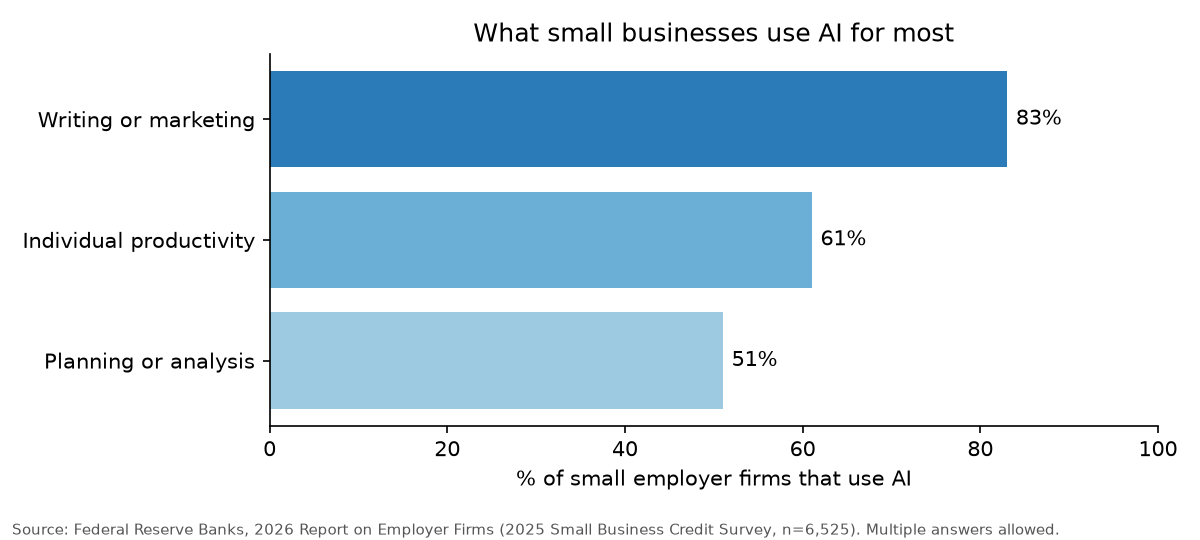 Most common AI tasks among small employer firms that use AI. Source: Federal Reserve Banks, 2026 Report on Employer Firms.
Our takeaway: 46% of firms use AI, and 46% of those users name accuracy as a challenge. Multiplying the two (0.46 x 0.46) means roughly 21% of all small employer firms, about 1 in 5, are using AI and struggling with wrong answers. That’s why nearly every prompt below tells the AI to use only the facts you give it, and why the last two prompts are about checking. One caution: the survey is a convenience sample, not a random one, so treat these as strong indicators, not exact national figures.
How to Use These Copy and Paste ChatGPT Prompts for Better Results
Anthropic’s prompting guide suggests treating the AI like “a brilliant but new employee who lacks context on your norms and workflows.” The more precisely you explain what you want, the better the result. The same guide notes that examples are one of the most reliable ways to steer tone and format (Anthropic).
In practice, that means:
- Start with a one-line business profile. Save something like “I own a 6-person HVAC company in Tulsa serving homeowners” and paste it at the top of each prompt.
- Paste an example of an email or post you liked.
- Ask for options. “Give me 3 versions” beats one draft.
- Push back. Follow up with “shorter,” “warmer,” or “less salesy.”
Tool: the 5-part prompt builder
Fill in this template once, save it, and paste it above any prompt on this page.
ROLE:    You are helping the owner of [BUSINESS TYPE] in [CITY].
CONTEXT: Our customers are [WHO]. We are known for [1-2 TRUE FACTS].
TASK:    [PASTE ONE OF THE 50 PROMPTS BELOW]
FORMAT:  [LENGTH, e.g., under 120 words] / [TONE, e.g., warm, plain] /
         [SHAPE, e.g., 3 options, bullets, table]
RULES:   Use only facts I provide. Don't invent prices, offers,
         statistics, reviews or policies. Write [CHECK] where you
         need information I didn't give you.
The RULES line is the one most people skip, and it’s the one that addresses the accuracy problem in the survey above.
Customer communication (prompts 1–8)
- “Write a friendly reply to this customer email. Answer their question, keep it under 120 words, and end with a clear next step: [PASTE EMAIL, NAMES REMOVED]”
- “Rewrite this message so it sounds calm and professional, not defensive: [PASTE DRAFT]”
- “Draft a text message reminding a customer about their appointment on [DAY/TIME] for [SERVICE]. Under 300 characters. Include how to reschedule: [PHONE/LINK].”
- “Write a polite email explaining that our price for [SERVICE] is going up from [OLD PRICE] to [NEW PRICE] on [DATE] because of [REASON]. Thank them for their loyalty.”
- “A customer is upset that [PROBLEM]. Our policy is [POLICY]. Write a reply that apologizes, explains what we can do, and offers [REMEDY].”
- “Write a short, friendly follow-up to a customer who received a quote for [JOB] [NUMBER] days ago and hasn’t replied. No pressure.”
- “Turn these notes into a clear job summary for the customer, in plain English: [PASTE TECHNICIAN NOTES]”
- “Write 8 FAQ answers for our website based on these real questions customers ask us: [LIST QUESTIONS]. Use only the facts I provide: [HOURS, AREA, POLICIES].”
More inbox help: AI email assistants for small business.
Reviews and reputation (prompts 9–13)
- “Write a warm, specific reply to this 5-star review. Mention what they liked and invite them back: [PASTE REVIEW]”
- “Write a calm public reply to this negative review. Don’t argue, don’t share private details, and invite them to contact [NAME/PHONE]: [PASTE REVIEW]”
- “Summarize these 20 reviews into the top 3 things customers love and the top 3 complaints: [PASTE REVIEWS]”
- “Draft a short text asking a happy customer to leave a Google review. Include this link: [LINK]. Don’t offer anything in exchange.”
- “Write a short internal note to staff about the most common complaint in these reviews and 3 practical fixes: [PASTE REVIEWS]”
See our Google review response guide. Never ask AI to write reviews for your own business; fake reviews violate the FTC’s rule on consumer reviews (16 CFR 465).
Marketing and social media (prompts 14–21)
- “Give me 10 social media post ideas for a [TYPE OF BUSINESS] in [CITY] for [MONTH]. Tie them to the season and local events I list: [EVENTS].”
- “Write a Facebook post announcing [OFFER] valid until [DATE]. Friendly, under 80 words, with one call to action.”
- “Rewrite this post in 3 tones: professional, casual and funny: [PASTE POST]”
- “Write a Google Business Profile update about [NEWS/SERVICE]. Under 150 words, include [CITY] naturally.”
- “Write a ‘Meet the team’ post about [EMPLOYEE NAME], [ROLE], who [FACT THEY APPROVED SHARING].”
- “Draft a monthly email newsletter for our customers with 3 sections: [TIP], [NEWS], [OFFER]. Subject line options too.”
- “Write a 100-word ‘About Us’ for our website. Facts: [YEAR FOUNDED, OWNER, SERVICES, AREA, WHAT MAKES US DIFFERENT]. No clichés like ‘one-stop shop.'”
- “Give me 5 short headline options for a flyer advertising [SERVICE/OFFER] to [AUDIENCE].”
Related: planning a month of social posts with AI and writing win-back emails with AI.
Sales, quotes and invoices (prompts 22–27)
- “Turn these job notes into a clean, itemized quote description the customer will understand: [PASTE NOTES]. Don’t add prices; I’ll fill them in.”
- “Write a short explanation of the difference between our [GOOD/BETTER/BEST] options: [DETAILS OF EACH].”
- “Write a polite first reminder for an invoice of [AMOUNT] due on [DATE]. Include how to pay: [METHOD].”
- “Write a firmer second reminder for an invoice now [NUMBER] days overdue. Stay professional.”
- “List the questions I should ask a new customer before quoting a [TYPE OF JOB].”
- “Write a thank-you email after a completed job that mentions [WARRANTY/MAINTENANCE TIP] and how to book again.”
Collections letters have legal rules; see our AI invoicing guide.
Operations and SOPs (prompts 28–34)
- “Turn these rough notes into a step-by-step checklist for [TASK], numbered, under 15 steps: [PASTE NOTES]”
- “Write an opening and closing checklist for a [TYPE OF BUSINESS] with [NUMBER] staff.”
- “Create a simple weekly schedule template for [NUMBER] employees covering [HOURS]. Show it as a table.”
- “Summarize this vendor contract in plain English and list anything I should ask a lawyer about: [PASTE CONTRACT, CONFIDENTIAL DETAILS REMOVED]”
- “Write a short safety reminder for my crew about [HAZARD]. Plain language, under 100 words.”
- “Compare these 3 supplier quotes in a table: price, delivery time, terms: [PASTE QUOTES]”
- “I spend [HOURS] a week on [TASK]. Suggest 3 ways to cut that time, including whether software could automate part of it.”
For automation ideas, see what to automate first with AI.
Hiring and team (prompts 35–40)
- “Write a job ad for a [ROLE] at a [TYPE OF BUSINESS] in [CITY]. Pay: [RANGE]. Hours: [HOURS]. Requirements: [LIST]. Use inclusive, plain language.”
- “Write 8 interview questions for a [ROLE] that focus on real situations, like handling an upset customer.”
- “Create a first-week onboarding checklist for a new [ROLE].”
- “Draft a friendly rejection email to a candidate we interviewed for [ROLE].”
- “Turn these notes into a fair, specific performance review with strengths and 2 goals: [NOTES, NO PERSONAL DETAILS]”
- “Write a short staff announcement about [POLICY CHANGE] taking effect [DATE].”
Don’t let AI make hiring decisions on its own. Read the biggest AI mistakes small business owners make for the EEOC case on automated screening, and set rules with our AI policy template.
Money and planning (prompts 41–45)
- “Here are my monthly expenses by category: [PASTE]. Point out the 3 biggest and suggest questions to ask about each.”
- “Help me build a simple break-even calculation. Fixed costs: [AMOUNT]. Average sale: [AMOUNT]. Variable cost per sale: [AMOUNT]. Show the math.”
- “Draft a one-page plan for [GOAL] over the next 90 days, with weekly steps.”
- “List the pros and cons of [OPTION A] vs. [OPTION B] for my business, given [CONSTRAINTS].”
- “I’m meeting with my accountant. Turn these questions into a clear, organized list: [PASTE QUESTIONS]”
Double-check any math, and confirm tax questions with a professional. See AI bookkeeping tools.
Learning and decision-making (prompts 46–50)
- “Explain [TOPIC] to me like I run a small [TYPE OF BUSINESS] and have 5 minutes.”
- “What questions should I ask a vendor before buying [SOFTWARE/SERVICE]? Include questions about data privacy and cancellation.”
- “Act as a skeptical customer. Read my [WEBSITE TEXT/OFFER] and tell me what’s confusing or unconvincing: [PASTE]”
- “Review this draft for errors, unclear sentences and anything that sounds like a promise we can’t keep: [PASTE]”
- “Answer this question, then list which parts I should verify and where (official agency or vendor pages): [QUESTION]”
Prompt 50 is worth using often. In the Federal Reserve survey above, accuracy was the most common AI challenge, cited by 46% of firms using AI.
Prompt Safety Rules
| Do | Don’t |
|---|---|
| Remove names, addresses and account numbers before pasting | Paste SSNs, card numbers, passwords or medical details |
| Use a business plan with training turned off for customer data | Use a personal free account for client files |
| Fact-check laws, prices and statistics | Publish AI facts without checking |
| Read every message before it’s sent | Let AI send customer messages unreviewed at first |
Details are in our AI data privacy guide. New to all of this? Start with our 30-day plan.
Guides by trade: for trade-specific workflows and examples, see our guides for HVAC and plumbing, contractors, restaurants, salons and barbershops, real estate agents, retail stores, landscaping and accountants.
Next Steps
- Fill in the 5-part prompt builder with your business details and save it in a note on your phone or computer.
- Pick the three prompts you’d use most this week (most owners start with 1, 9 and 24) and run them.
- Save your best outputs as examples; paste them into future prompts to set the tone.
- Make a shared prompt doc for your team with your top 10 prompts and the safety rules.
- Run prompt 50 on any fact you plan to publish or rely on, and open the sources it lists.
Frequently Asked Questions
What are good ChatGPT prompts for small business owners?
The most useful ones handle weekly writing jobs: customer replies, review responses, social posts, quote descriptions, invoice reminders and checklists. Give each prompt your business type, city, customer and the facts to use, and tell the AI not to invent anything.
Do these prompts work in free versions of ChatGPT, Gemini and Claude?
Yes. They’re plain-language prompts with no special features required. Free plans have usage limits, and paid business plans offer more data protections; check each vendor’s current terms.
What should I never put into an AI prompt?
Social Security numbers, card or bank numbers, passwords, health information and anything you’ve promised a client to keep confidential.
Why do I get generic answers?
Usually because the prompt lacks context. Add your business type, city, customer and goal, and paste an example of what you like.
Can I save prompts so I don’t retype them?
Most chatbots let you save instructions or create reusable assistants. Features vary by plan, so check your tool’s settings. A shared document of your team’s best prompts works too.
Can AI write my legal or tax documents?
It can help draft and summarize, but have a qualified professional review anything legal or tax-related. Courts have sanctioned lawyers who filed AI-invented citations.
Sources and Methodology
How we gathered the data: Usage and challenge figures come from the Federal Reserve Banks’ 2026 Report on Employer Firms (2025 Small Business Credit Survey, 6,525 responses from firms with 1 to 499 employees, fielded September 3 to November 14, 2025), read on November 17, 2026. The “1 in 5” figure is our own multiplication of two published percentages and assumes the accuracy share applies evenly across AI users. Prompting advice is from Anthropic’s public prompting guide. We wrote the 50 prompts for this guide; we have not tested every prompt in every tool, and results vary by tool and plan. This is general information, not legal or tax advice. No affiliate links.
- Anthropic – Prompting best practices: https://platform.claude.com/docs/en/build-with-claude/prompt-engineering/claude-prompting-best-practices
- Federal Reserve Banks – 2026 Report on Employer Firms (Small Business Credit Survey): https://www.fedsmallbusiness.org/reports/survey/2026/2026-report-on-employer-firms
- eCFR – 16 CFR Part 465, Use of Consumer Reviews and Testimonials: https://www.ecfr.gov/current/title-16/chapter-I/subchapter-D/part-465